App launch checklist: the first 30 days, step by step
A practical app launch checklist: what to check before you publish, what to do on launch day, and what to watch in the first 30 days.
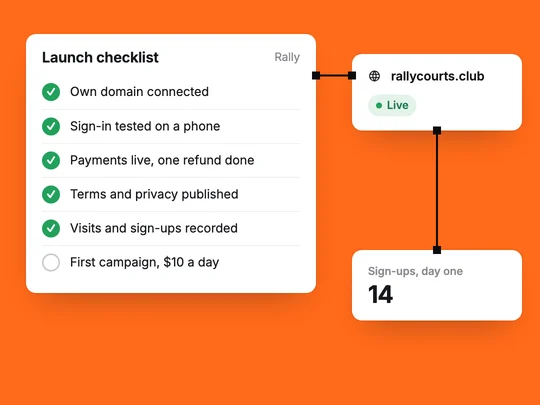
Launching an app means three stages: making sure the app is ready for strangers, getting it in front of the first people, and learning from them quickly. The checklist below covers each stage, with what to check and why it matters.
What should you check before you launch?
The parts a demo can skip and a real customer cannot. Go through them on a phone and on a computer, signed out and signed in.
| Check | Why it matters |
|---|---|
| Your own domain is connected | A real address builds trust and keeps working if you change tools. |
| Sign-in works with each method you offer | A broken sign-up loses the people your launch brought in. |
| Payments are live, not in test mode | Test checkouts take no money. Test in the test environment, switch to live, and watch the first real order arrive. |
| Terms and privacy pages are published | Customers, payment providers and app stores expect them. |
| Analytics records visits and sign-ups | Without it, launch week teaches you nothing. |
| A version you can go back to is saved | If a change breaks something on launch day, you can restore the last good one. |
In ExaSpark most of this sits in one place: publishing gives you a free exaspark.app link and your own domain on paid plans, the app gets its own terms and privacy pages, and every change is kept as a version you can restore. See Publish and custom domains.
What should you do on launch day?
Publish the version you checked
Do not slip in last-minute changes. Ship what you tested.
Tell the people you already know
Past customers, a waitlist, colleagues, a community you belong to. A personal message beats a broadcast.
Start one paid channel, small
One campaign with a daily budget you are comfortable losing. You are buying information, not scale.
Watch the first sessions
Look at where visitors come from and where they stop. The first day often shows the biggest problem.
What should you watch in the first 30 days?
The path from a visit to a sign-up to a payment, and the health of the app underneath it. Each week, ask three questions: where do visitors come from, how many of them sign up, and how many of those pay.
- Visitors by source. Which link, search or campaign brought them.
- Sign-ups and payments. The two numbers that tell you whether the product works for strangers.
- Errors and uptime. A slow or broken page looks like a product problem when it is a technical one.
ExaSpark shows visitors, top pages and sign-ups next to response time, uptime and errors for every app, and sales appear in your dashboard. If you run Google Ads from the workspace, the ad agent reports what the ads bring in and asks before it spends more. See Visitors and performance and Google Ads.
How fast should you change things after launch?
Change one thing at a time, and give each change long enough to show an effect. If you change the price, the page and the campaign in the same week, you will not know which one helped. Keep a short note of what you changed and when; it makes the numbers readable a month later.
If you are not there yet, this request gives you something to launch with checkout and tracking already in place:
Build a launch page for my product with an email sign-up and a Stripe pre-order, publish it on my domain, and show me visitors, sign-ups and pre-orders.
Frequently asked questions
- What should I do before launching an app?
- Connect your own domain, test sign-in with every method you offer, switch payments from test mode to live, publish terms and privacy pages, turn on analytics and save a version you can go back to.
- How do I get my first users after launch?
- Start with the people you already know, such as past customers, a waitlist or a community you belong to, and add one paid channel with a small daily budget to learn which messages bring sign-ups.
- What should I measure after launching an app?
- Visitors by source, sign-ups and payments, plus errors and uptime. Together they show where people come from, whether they stay, and whether a technical problem is getting in the way.

