How sign-in works: authentication and permissions explained
How app sign-in works: authentication versus permissions, passwords and Sign in with Google, sessions, and roles that decide who can see and change what.
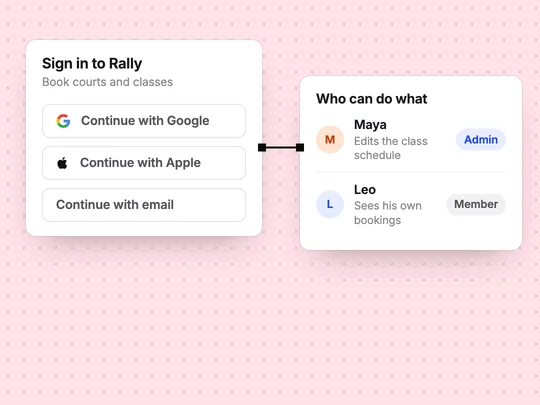
Sign-in has two jobs. Authentication checks who someone is: their password, or a confirmation from Google or Apple. Authorization, usually called permissions, decides what that person may do once they are in: a member books a class, an admin edits the timetable. Most problems with sign-in come from mixing the two up.
What is the difference between authentication and authorization?
| Authentication | Authorization | |
|---|---|---|
| Question it answers | Who are you? | What may you do? |
| When it happens | At sign-in | On every page and action |
| Example | Signing in with Google | Only admins can edit the timetable |
| If it is wrong | The wrong person gets in | The right person sees too much, or too little |
How does signing in with a password work?
The app stores a scrambled version of the password, called a hash, never the password itself. When someone signs in, the app scrambles what they typed the same way and compares the two. Then it gives the browser a session, a token that says "this person is signed in" until they sign out or it expires, so they do not type the password on every page.
How does Sign in with Google or Apple work?
The person signs in on Google's or Apple's own page, and the provider tells your app who they are. Your app never sees or stores their password, which removes one of the riskiest things an app can hold. For your customers it means one less password to remember. MDN's guide to HTTP authentication covers the underlying web mechanisms.
What are roles and permissions?
A role is a group of permissions you give to a kind of user. Most apps need two or three:
- Visitor: not signed in; sees public pages only.
- Member: signed in; sees and changes their own data, such as their bookings.
- Admin: runs the business; sees everyone's data and changes settings.
The rule that matters most is that members see only their own records. Check it by signing in as two different members and making sure neither can see the other's bookings.
How do you add sign-in to an app without code?
Describe who signs in and who can do what, in plain words. In ExaSpark, people can sign up with Google, Apple or email, the app gets a database for their data, and roles for members and admins follow from requests such as "only admins can edit the class schedule". See Accounts and data.
Let members sign in with Google or Apple and book classes, show each member only their own bookings, and let only admins edit the class schedule.
Frequently asked questions
- What is the difference between authentication and authorization?
- Authentication checks who someone is, for example with a password or Sign in with Google. Authorization decides what that person may do, such as whether they can edit the schedule.
- Is Sign in with Google safe for my app?
- It removes the need for your app to store passwords, because Google confirms who the person is and your app never sees their password. You still decide what each person may do inside your app.
- How are passwords stored in an app?
- A well-built app stores a hash, a scrambled version of the password, never the password itself, and compares hashes when someone signs in.

