Web app vs mobile app vs PWA: which should you build first?
Web apps, mobile apps and progressive web apps compared on how people find them, updates, app store rules and cost, and which to build first.
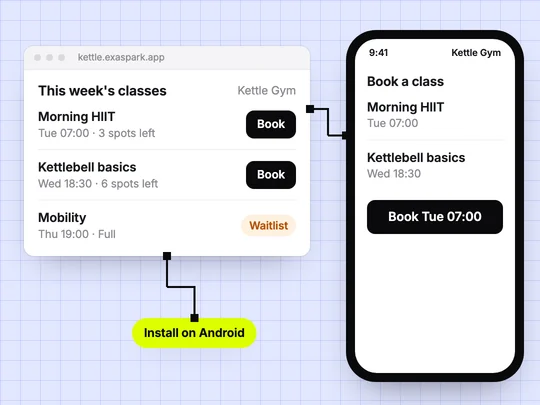
Start with a web app unless you already know your customers will use the product every day on their phone. A web app opens from a link on any device, changes go live as soon as you publish, and there is no review queue. Add a mobile app when the web version has proved people want it and a home-screen app would make them use it more.
What is the difference between a web app, a mobile app and a PWA?
A web app runs in the browser and lives at an address, such as a booking site or a customer portal. A mobile app is installed on the phone, usually from the App Store or Google Play. A progressive web app (PWA) is a web app that people can add to their home screen, so it opens like an app but is still a website underneath. MDN's guide to PWAs explains how they work.
| Web app | Progressive web app | Mobile app | |
|---|---|---|---|
| How people get it | Open a link | Open a link, then add to the home screen | Install from an app store or an install link |
| Updates | Live when you publish | Live when you publish | Through a new build; store versions may need review |
| App store rules | None | None | The store's review and policies apply |
| Cost to publish | Hosting and a domain | Hosting and a domain | Developer accounts: Apple $99 a year, Google Play $25 once |
| Access to the phone | What the browser allows | What the browser allows | The most, through the operating system |
| Best for | Most first versions | Frequent use without the stores | Daily use on the phone |
The developer account fees come from Apple and Google Play, as listed in October 2026.
When should you build a web app first?
When you are still finding out whether people want the product. A link is the shortest path from an idea to a visitor: you can share it in a message, put it in an ad, or send it to a customer you met yesterday. Most products that people use at a desk, or now and then, never need more.
- Booking sites, online stores, client portals and internal tools.
- Anything people find through search or ads, where a link beats an install.
- First versions you expect to change every week.
When is a mobile app worth it?
When the product earns a place on someone's phone: they open it several times a week, they use it away from a desk, and having it one tap away makes them come back. A gym's class booking, a habit tracker or a loyalty card fit; a one-off quote form does not.
Count the extra work too. Each store has its own review, listing, screenshots and policies, and every update ships as a new build. Start this once the web version shows people return to it.
Is a PWA a good middle ground?
Often, yes. A PWA keeps the web's advantages, one link and instant updates, and adds a home-screen icon. What it cannot always do is reach every phone feature or appear in the app stores, and support differs between browsers and operating systems. If being in Google Play matters to your customers, a mobile app is the more direct route.
Can one project be both a website and a mobile app?
With ExaSpark it can. The same project can become an Android app with the same data and sign-in as the website, shared with a QR code for testing or prepared as a build for Google Play. You keep one set of customers and one set of numbers instead of two products. Android apps covers the details.
A sensible order is to publish the website, see who uses it and how often, then add the Android app for the people who come back:
A class booking app for my gym: members sign in, see this week's classes, book a spot and see their bookings. Make it work on the web and as an Android app.
Frequently asked questions
- Should I build a web app or a mobile app first?
- For most new products, a web app first. It opens from a link, updates when you publish and needs no store approval. Add a mobile app once people use the product often on their phone.
- What is a progressive web app?
- A progressive web app is a website that people can add to their home screen, so it opens like an app. It updates like a website, but it cannot always reach every phone feature or appear in the app stores.
- How much does it cost to publish a mobile app?
- Apple's developer program costs $99 a year and a Google Play developer account costs $25 once, according to their own pages in October 2026. Building and maintaining the app is a separate cost.
- Can I turn my website into an Android app?
- With ExaSpark, the same project can become an Android app with the same data and sign-in, shared with a QR code or prepared as a build for Google Play.

