What is a database? A plain-English guide for app builders
What a database is, how tables, rows and relationships store your app's data, what belongs in one and what does not, explained with a booking app.
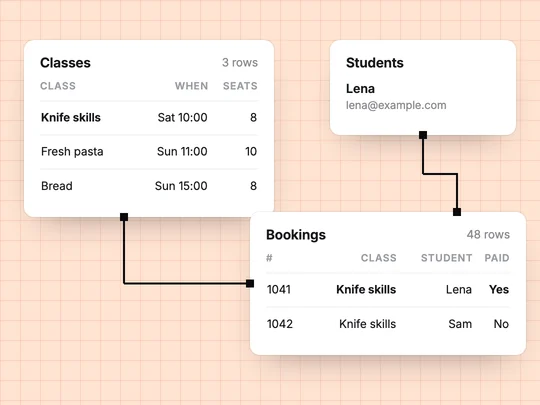
A database is where an app keeps information that has to outlast a visit: who signed up, what they booked, what they paid. Without one, everything disappears when the page closes. Most apps store their data in tables, a little like spreadsheets, with rules about how the tables connect. MDN's glossary has the short definition.
How does a database store information?
In tables. Each table holds one kind of thing, each row is one item, and each column is one detail about it. A cooking school's bookings table might look like this:
| Booking | Class | Student | Date | Paid |
|---|---|---|---|---|
| 1041 | Knife skills | Lena | Sat 10:00 | Yes |
| 1042 | Knife skills | Sam | Sat 10:00 | No |
| 1043 | Fresh pasta | Ana | Sun 11:00 | Yes |
What are relationships between tables?
Links that let one table point to another instead of repeating information. The booking above does not copy the student's email and the class's price; it points to the student and the class. Change the class time once, and every booking shows the new time.
- A student has many bookings.
- A class has many bookings, up to its number of seats.
- A booking belongs to one student and one class.
What should you keep in a database, and what not?
| Keep it | Keep it elsewhere |
|---|---|
| Users, bookings, orders, messages | Card numbers: a hosted checkout keeps them with the payment provider |
| Settings and content that change | Large files: photos and videos go in file storage, with a link in the database |
| The status of each payment | Passwords in plain text: store a hash, or use Sign in with Google or Apple |
Do you need to design the database yourself?
Not with an AI app builder. Describe the data in the words you would use with a colleague, and the builder turns it into tables and links. In ExaSpark, "bookings with a date, a class and the student's name" becomes the right fields, and the database is created as the app needs it. What you should still check is that the links match how your business works, for example that a class cannot be booked beyond its seats. See Accounts and data.
How do you see and change the data later?
Through the app's admin pages, or through a data view in your builder. Before launch, add a few test records, delete them, and check that what customers see updates. After launch, export important data regularly so a mistake is never the only copy.
Build a booking site for my cooking school that saves classes with a date, a time and a number of seats, students with their name and email, and bookings that link a student to a class without going over the seats.
Frequently asked questions
- What is a database in simple terms?
- A database is where an app keeps information that must survive after the page closes, such as users, bookings and orders, usually in tables of rows and columns.
- Do I need a database for my app?
- If people sign in, save anything, or pay, yes. A website that only shows information may not need one.
- Should I store credit card numbers in my database?
- No. Use a hosted checkout such as Stripe Checkout, where the card is entered on the payment provider's page and stays with them.

