What is an API? A simple explanation with examples
What an API is, how apps use one to talk to services such as payments, why API keys stay secret, and what webhooks add, with one booking example.
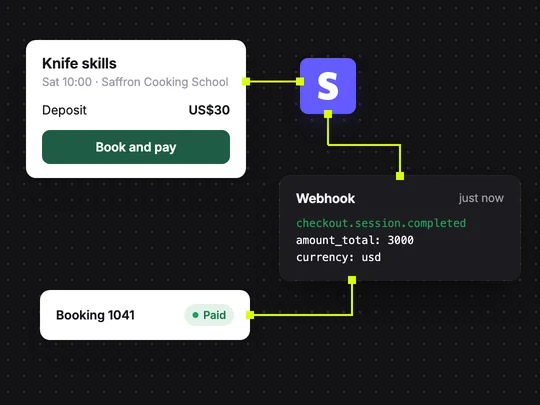
An API (application programming interface) is how one program asks another for something and gets an answer back. When your booking site takes a card payment, it does not handle the card itself: it asks a payment service through that service's API, and the service replies with the result. MDN's glossary gives the general definition.
How does an API work?
Your app sends a request to an address the service publishes, called an endpoint, with what it wants and who it is. The service checks the request, does the work and sends back a response, usually as structured data. A good API documents every endpoint, what to send and what comes back, so builders know exactly how to use it.
What is an example of an API in a real app?
Follow one booking at a cooking school:
The student clicks Book and pay
The site asks the payment service's API to start a checkout for a $30 deposit.
The service hosts the payment page
With a hosted checkout such as Stripe Checkout, the card is entered on Stripe's page, not yours.
The service tells your app it worked
Stripe calls your app back with an event saying the checkout completed.
Your app marks the booking paid
It updates the database, and the student sees the booking confirmed.
What is an API key, and why must it stay secret?
An API key is a long code that tells a service which account a request comes from, so it can bill and limit it. Some keys are meant to be public; secret keys can move money or read private data, so they must live on the server and never in the page a visitor can open. If a secret key leaks, revoke it in the service's dashboard and create a new one.
What is the difference between an API and a webhook?
| API call | Webhook | |
|---|---|---|
| Who starts it | Your app asks the service | The service calls your app |
| When | When your app needs something | When something happens on the service's side |
| Example | Start a checkout for $30 | The checkout completed; mark the booking paid |
| What you build | The request | An address that listens and checks the event is genuine |
Stripe's webhooks guide shows how payment events reach an app, including how to check that an event really came from Stripe.
Do you need to work with APIs to build an app?
Not directly, if your builder connects the common ones for you. In ExaSpark, describing what you sell and the price adds Stripe checkout to your app, and the AI models that build it need no API keys of your own. Understanding what happens underneath still helps when you decide what to connect next. See Payments.
Add Stripe checkout to my cooking school site: a $30 deposit when a student books, the booking marked paid when the payment completes, and a list of paid bookings for staff.
Frequently asked questions
- What is an API in simple terms?
- An API is a set of rules that lets one program ask another for something and get an answer, the way a booking site asks a payment service to charge a card.
- What is the difference between an API and a webhook?
- With an API call, your app asks a service for something. With a webhook, the service calls your app when something happens, such as a completed payment.
- Is it safe to put an API key in my website?
- Only keys meant to be public. Secret keys can move money or read private data, so they must stay on the server; if one leaks, revoke it and create a new one.

