Google Ads for beginners: your first campaign for a new app or website
A first Google Ads campaign for a new app or website: a Search campaign, buying-intent keywords, a small budget, one landing page and tracking.
A first Google Ads campaign should be small and narrow: one Search campaign, a few keywords typed by people who are ready to buy, one landing page that answers those searches, conversion tracking switched on, and a daily budget you can afford to lose while you learn. The goal of the first weeks is not scale. It is to find out whether any search reliably turns into a customer at a cost that works for you.
Which Google Ads campaign type should a beginner choose?
Search. Search ads appear in Google's results to people who are looking for what you offer right now, and you can see the exact searches you paid for, which makes them the easiest to judge. Google offers other campaign types for its other surfaces (Google Ads Help):
| Campaign type | Where ads show | As a first campaign |
|---|---|---|
| Search | Google search results | Yes: people are already looking |
| Performance Max | Across Google's inventory, chosen automatically | Later, once conversion tracking has data to work with |
| Display | Image ads on websites and apps | Later, mostly to reach past visitors again |
| Video | YouTube and other sites | When you have a video worth showing |
| Shopping | Product listings in search results and the Shopping tab | For online stores with a product catalogue |
| App | Search, Google Play, YouTube and other surfaces | For promoting an installable app |
How do you choose keywords for your first campaign?
Start from what a ready customer would type. "Padel court booking east austin" is a buyer; "what is padel" is a reader. A short list of keywords around one offer is enough to start.
- Buying words: book, price, near me, hire, appointment, delivery.
- What you sell and where: the service and the area, if you serve a local market.
- Match types: broad match, the default, reaches related searches; phrase and exact match give more control and less reach (Google Ads Help). With a small budget, control matters more than reach.
- Negative keywords: words that rule a search out, such as "free" or "jobs", so you do not pay for clicks that will never buy (Google Ads Help).
How much should you spend on Google Ads at first?
An amount you are comfortable losing over three or four weeks of learning. Google Ads works with an average daily budget: for most campaigns it can spend up to twice that amount on a given day, but it will not charge more than 30.4 times it in a month (Google Ads Help). A $10 daily budget therefore means up to about $304 a month.
A budget that is too small has a cost too. If a campaign gets a handful of clicks a week, it takes a long time to learn anything. Use fewer keywords rather than spreading a small budget thin.
What makes a good landing page for Google Ads?
One page that matches the search and asks for one action. Someone who searched for a court booking should land on court times and a Book button, not on your homepage. Landing page experience is one of the three parts of Quality Score, Google's diagnostic for how relevant and useful your ad and page are to the people who click (Google Ads Help).
- The headline repeats what they searched for.
- Price and availability are near the top.
- The action is one step: book, pay a deposit or request a quote.
- It loads quickly on a phone, where many searches happen.
What should you check after the first week?
| Check | Where | What to do |
|---|---|---|
| Which searches triggered your ads | The search terms report | Add irrelevant searches as negative keywords |
| Cost per conversion | Campaign reports, with conversion tracking on | Compare it with what a customer is worth to you |
| Keywords that spend but never convert | Keyword reports and the landing page | Check the page matches the search, then pause the keyword |
| Conversions reported versus real sales | The ad account and your own records | If they disagree a lot, fix tracking before changing bids |
The search terms report shows the actual searches that showed your ads and which of your keywords matched them (Google Ads Help). Change one thing at a time and give it a week, so you know which change made the difference.
How do you run Google Ads from ExaSpark?
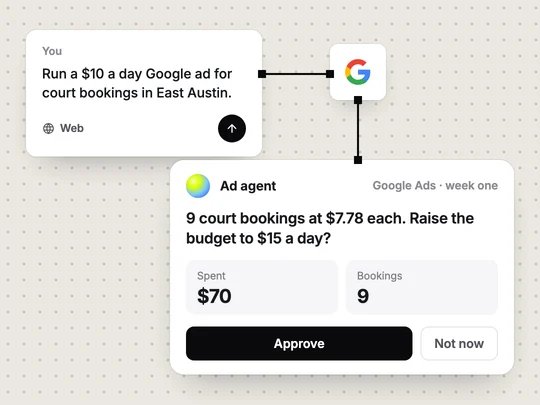
From the same workspace as your app. You set the daily budget; the ad agent runs the campaign, reports what the ads bring in, such as the cost of each booking, and asks before it spends more. Because the landing page, the checkout and the ads are in one place, a paid booking can be traced to the campaign behind it. See Google Ads.
A first campaign, with the page it sends people to, can start from one request:
Build a court booking page for my padel club with a $20 Stripe deposit, then run a $10 a day Google search campaign for court bookings in East Austin and tell me what each booking costs.
Frequently asked questions
- How much should a beginner spend on Google Ads?
- An amount you are comfortable losing over a few weeks while you learn. For most campaigns Google can spend up to twice your average daily budget on a single day, but no more than 30.4 times it in a month.
- Which Google Ads campaign is best for beginners?
- A Search campaign, because the ads reach people already searching for what you offer and you can see exactly which searches you paid for.
- Do I need conversion tracking for Google Ads?
- Yes, before you spend. Without it you only see clicks, not which of them became bookings, sign-ups or payments.
- Can I run Google Ads for an app built with AI?
- Yes. With ExaSpark you run Google Ads from the same workspace as the app: you set the daily budget, and the ad agent reports results and asks before it spends more.

