What is conversion tracking, and how do you set it up?
Conversion tracking explained: tags, events and attribution, what to count, browser versus server-side tracking, consent, and how to set it up.
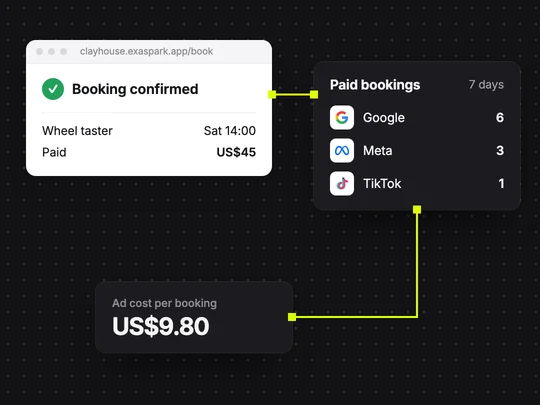
Conversion tracking is how an ad platform learns which clicks turned into customers. When a visitor who came from an ad signs up, books or pays, a tag on your site or a message from your server reports that action, the conversion, back to the platform. Without it you see clicks and spend. With it you see what each booking cost and which campaign brought it. Google leaves the choice of what counts to you: a purchase, a sign-up, a phone call or any other action you value (Google Ads Help).
What do tag, event, conversion and attribution mean?
| Term | What it means | Example |
|---|---|---|
| Tag or pixel | A snippet of code on your site that sends information to an ad platform | The Google tag or the Meta Pixel on every page |
| Event | Something a visitor does that the tag reports | Viewed a class, started checkout, paid |
| Conversion | An event you have marked as valuable | A paid booking |
| Attribution | The rule that decides which ad gets credit | The search ad clicked before the booking |
Meta describes its Pixel as JavaScript that tracks visitor activity on your website, with the actions it records showing up as conversions in Ads Manager (Meta for Developers). The Google tag does the same job for Google Ads.
What should you count as a conversion?
The action closest to money that happens often enough to measure. For most small businesses that is one of these:
- A payment or a paid booking. The strongest signal, because it is revenue.
- A sign-up or a lead form. Useful when payment comes later, as with a free trial or a quote.
- A phone call or a booked call. For services that are sold in conversation.
Keep page views and button clicks as secondary events. Google Ads lets you mark each conversion action as primary, which bidding uses, or secondary, which you only observe (Google Ads Help). If you tell a platform to find people who visit your pricing page, it will find people who visit pricing pages.
What is the difference between browser and server-side tracking?
A browser tag runs in the visitor's browser. It is quick to add, but it misses some conversions: blocked scripts, privacy settings, weak connections and visitors who close the tab before the confirmation page loads. Server-side tracking sends the same events from your own server, which knows for certain that a payment went through.
| Browser tag | Server-side events | |
|---|---|---|
| Where it runs | In the visitor's browser | On your server |
| Setup | Add a snippet, or connect the platform in your builder | Connect your server to the platform's API |
| What gets in the way | Blocked scripts, closed tabs, weak connections | Less, because the server records the payment itself |
| Examples | Google tag, Meta Pixel, TikTok Pixel | Meta Conversions API, TikTok Events API |
The platforms recommend using both. TikTok suggests running its Events API together with the Pixel and deduplicating events, so one booking is not counted twice (TikTok For Business). Meta processes server events from its Conversions API the same way as Pixel events (Meta for Developers).
How do you set up conversion tracking, step by step?
Choose one main conversion
A paid booking, a sign-up or a lead. Write down what one is worth to you.
Put the platform's tag on every page
The Google tag, the Meta Pixel or the TikTok Pixel, or connect the platform in your builder and let it add them.
Send an event when the conversion happens
From the confirmation page, or better, from the server once the payment is confirmed.
Follow the visitor's consent choice
Load ad tags according to what the visitor accepted in your cookie banner.
Check the first real bookings
Compare the first few paid bookings with the conversions in the ad platform. Each booking should appear once: not zero times and not twice.
How does consent affect conversion tracking?
Where privacy rules require consent for ad cookies, tags have to respect the visitor's choice. Google's consent mode passes that choice to Google tags. In its basic form, tags stay blocked until the visitor agrees; in its advanced form, they send only cookieless pings while consent is denied, which Google uses to model conversions (Google Ads Help). Expect reported conversions to fall short of real bookings when many visitors decline, and treat your own sales records as the source of truth.
How does conversion tracking work in ExaSpark?
ExaSpark's ad integrations for Google, Meta and TikTok include conversion tracking, so a booking in your app can be traced to the campaign behind it. When the ad agent runs Google Ads for you, it reports what the ads bring in, such as the cost of each booking, and asks before it spends more. Sales appear in your dashboard next to visitors and sign-ups. See Google Ads, and Google Ads for beginners for a first campaign.
To have tracking in place from the start rather than adding it later, ask for it in the first request:
Build a booking page for my pottery studio's weekend classes with a $45 Stripe checkout, connect Google and Meta ads with conversion tracking on paid bookings, and show me which channel brings paying customers.
Frequently asked questions
- What is conversion tracking in simple terms?
- It is how an ad platform learns which ad clicks led to a valuable action on your site, such as a sign-up, a booking or a payment, so you can see what each result cost and which campaign brought it.
- What is the difference between a pixel and a conversions API?
- A pixel is code that runs in the visitor's browser. A conversions API sends the same events from your server, which misses fewer of them. Meta and TikTok recommend using the two together, with duplicate events removed.
- What should I track as a conversion?
- The action closest to revenue that happens often enough to measure, usually a payment, a paid booking or a sign-up. Keep page views and clicks as secondary events.
- Why don't my ad platform's conversions match my sales?
- Visitors who decline cookies, blocked scripts, different attribution rules and people who see an ad on one device and buy on another all create gaps. Treat your own sales records as the source of truth.

