How to build a membership website: tiers, sign-in and recurring payments
How to build a membership website: what members get, tiers, sign-in, members-only pages, recurring payments and cancellations.
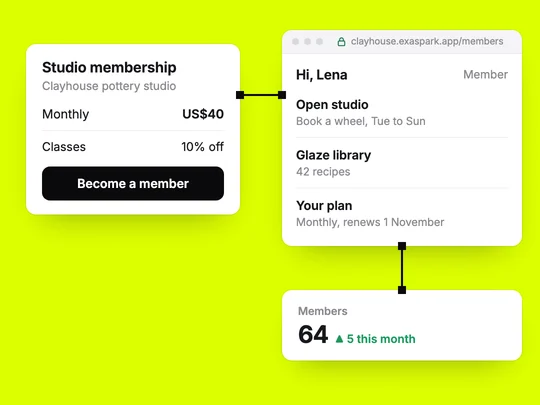
To build a membership website, decide what members get that visitors don't, set a price for it, and connect four parts: sign-in, pages only members can open, a recurring payment, and a way to cancel. An AI app builder can put all four together from one description. The harder part is the offer, so start there.
What is a membership website?
A site where people pay on a schedule for access. The access can be content, such as lessons or recordings; a service, such as priority booking; a discount; or a community. A pottery studio might charge $40 a month for open studio time and 10% off classes. A tutor might sell a yearly pass to recorded lessons and a weekly group call.
| Type | What members pay for | Example |
|---|---|---|
| Content | Lessons, recordings, guides, recipes | A cooking school's library of class recordings |
| Access | Priority or included bookings | Padel club members book 14 days ahead instead of 3 |
| Perks | Discounts and members-only offers | 10% off every class at a pottery studio |
| Community | A group, events, direct contact | A tutor's weekly group call for members |
What do you need to decide before you build?
- The benefit. One sentence a member would repeat to a friend: "I can use the wheels any evening, and every class is 10% off."
- The price and the period. Monthly is easier to say yes to; yearly brings cash up front and fewer renewals to manage. Many sites offer both, with the yearly plan cheaper per month.
- What visitors still see. A public page with the offer, the price and a free sample, so people know what they are paying for.
- What happens when someone stops paying. Access ends straight away or at the end of the period they paid for. Decide before the first cancellation, not during it.
How do you build a membership website step by step?
Write the offer page first
Headline, who it is for, what members get, the price and one button. If nobody clicks it, the rest can wait.
Add sign-in
Let people create an account with Google, Apple or email before they pay, so every payment belongs to a person you can recognise later.
Mark the members-only pages
Decide page by page what a visitor, a member and an admin can see. The check has to happen on the server, not only by hiding a link.
Connect a recurring payment
A subscription that charges on the same day each month or year and records whether the member is paid up.
Give members an account page
Their plan, the next payment date, past receipts, and a clear way to change card or cancel.
Test it as three people
A visitor, a paying member and a member whose payment failed. Each should see exactly what you decided, and nothing more.
How do recurring payments and cancellations work?
A subscription charges the member's card on a schedule and tells your site whether each payment went through. With Stripe, which ExaSpark uses for checkout, the card details stay with Stripe; your site keeps only the member's status.
Two moments decide how members feel about you. The first is a failed payment, usually an expired card. Stripe can retry failed subscription payments automatically, and its recommended default is 8 tries within 2 weeks, according to its guide to payment retries in October 2026. Pair the retries with a message asking the member to update their card before access ends.
The second is cancelling. Make it as easy to leave as it was to join. Stripe's customer portal lets customers update their payment method, see their invoices, and cancel immediately or at the end of the period they paid for. A member who leaves on good terms is more likely to come back.
Should you offer more than one membership tier?
Not at first. One tier with one clear benefit is easier to explain, easier to price and easier to change. Add a second tier when members ask for more of something specific, such as extra bookings or one-to-one time, and price it from that request. Three tiers can work later, once you know which benefit people pay for. Launched on day one, they mostly give visitors a decision to put off.
Can you build a membership website without code?
Yes. In ExaSpark you describe the offer, and the site gets sign-in with Google, Apple or email, a database for members, roles for members and admins, and Stripe checkout for subscriptions. Sales appear in your dashboard and are paid out to your bank. See Accounts and data and Payments.
If you are not yet sure people will pay, a single page with a pre-order is a cheaper test; How to validate an app idea covers it. And because recurring revenue changes which numbers to watch, How do apps make money? compares subscriptions with one-off sales.
For a pottery studio, a first version could start from this request:
Build a membership site for my pottery studio: a public page with the offer, a $40 monthly membership through Stripe that includes open studio booking and 10% off classes, members sign in with Google or email, only members see the booking calendar, and each member has a page with their plan and bookings.
Frequently asked questions
- What do I need to build a membership website?
- A clear offer, sign-in, pages only members can open, a recurring payment, and a page where members manage or cancel their plan. An AI app builder can create all of these from one description.
- How do membership websites take recurring payments?
- Through a subscription with a payment provider such as Stripe, which charges the member on a schedule and tells the site whether each payment succeeded, so access follows payment.
- What happens when a member's payment fails?
- The payment provider can retry it automatically, and the site should ask the member to update their card. Decide in advance whether access ends straight away or after the retries.
- How many membership tiers should I offer?
- Start with one. Add a second tier when members ask for more of something specific, and price it from that request.

