How to make your website load faster
Why speed matters, what Core Web Vitals measure and their good thresholds, how to test your site, and the fixes that speed up most small websites.
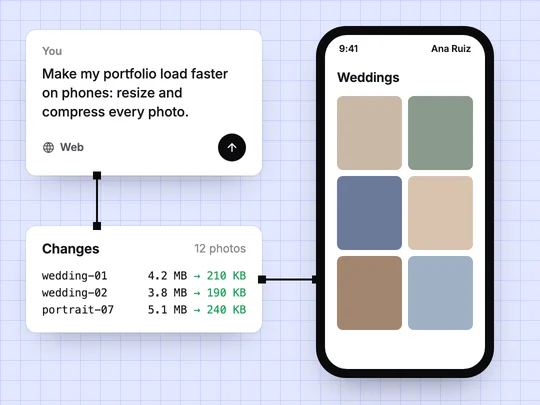
Most small websites are slow for a handful of reasons: images far larger than the screen shows, scripts from other companies, and fonts or videos that load before anything useful appears. Fixing those makes the biggest difference. To know whether you have fixed them, use the measures Google uses, the Core Web Vitals, and check them on a phone.
Why does website speed matter?
A visitor who waits looks elsewhere, especially on a phone with a weak connection. Google also cares: it highly recommends that site owners achieve good Core Web Vitals, which it says align with what its core ranking systems seek to reward (Google Search Central). And because Google indexes and ranks the mobile version of a site (Google Search Central), a page that is fast on your laptop and slow on a phone is slow where it counts.
What are Core Web Vitals?
| Metric | What it measures | Good |
|---|---|---|
| Largest Contentful Paint (LCP) | How long until the main content, often the largest image or heading, appears | Within 2.5 seconds |
| Interaction to Next Paint (INP) | How quickly the page responds to a tap, click or key press | 200 milliseconds or less |
| Cumulative Layout Shift (CLS) | How much the page jumps around while it loads | 0.1 or less |
The thresholds come from web.dev, which recommends measuring them at the 75th percentile of page loads, on mobile and desktop separately. The page should be good for most visits, not only the fastest.
How do you check how fast your website is?
- PageSpeed Insights. Google's free PageSpeed Insights shows Core Web Vitals from real visits when Google has enough data, plus a lab test with suggestions.
- Search Console. Its Core Web Vitals report groups your pages by status once the site has enough traffic.
- Your own phone, on mobile data. Notice what appears late, what jumps and what feels slow to tap.
What makes a website slow, and how do you fix it?
| Cause | What you notice | Fix |
|---|---|---|
| Oversized images | The main photo appears last | Resize to the size shown, compress, use a modern format such as WebP |
| Images without set dimensions | Text jumps down as images load | Give every image its width and height |
| Scripts from other companies | Taps feel slow, and the page waits | Remove widgets and trackers you no longer use |
| Web fonts | Text appears late or changes style | Use one or two font families |
| Autoplay video | A long wait before anything shows | Show a still image and play on tap |
| A slow server | Every page waits before it starts | Check response time; your host or builder should keep it low |
Start with images. On a photo-heavy site such as a photographer's portfolio, they are most of what a visitor downloads, and a photo sized for a large monitor is wasted on a phone.
How does ExaSpark help a site stay fast?
ExaSpark watches response time, uptime and errors for every app and shows them next to visitors and top pages, so a slow server shows up as a number rather than a complaint. See Visitors and performance. What is on the page is still yours to keep light: ask for images to be resized and for anything you no longer use to be removed, one change at a time, and check again on a phone. Every change is kept as a version, so a fix that breaks something can be undone. What is web hosting? covers the server side.
For a site with many photos, the first request is usually this one:
Make my photography portfolio load faster on phones: resize every photo to the size it is shown at, compress them, give each image its width and height, and remove scripts the site no longer uses.
Frequently asked questions
- What is a good loading time for a website?
- Google's guidance is that the main content should appear within 2.5 seconds, measured as Largest Contentful Paint at the 75th percentile of page loads, on mobile and desktop separately.
- What are Core Web Vitals?
- Three measures of page experience: Largest Contentful Paint for loading, Interaction to Next Paint for responsiveness, and Cumulative Layout Shift for visual stability.
- What slows down a website the most?
- On most small sites, images far larger than they are shown, followed by scripts from other companies, web fonts and autoplay video.
- How do I test my website's speed?
- Use Google's PageSpeed Insights, the Core Web Vitals report in Search Console once the site has traffic, and your own phone on mobile data.

