How to turn your website into an Android app
Turn a website into an Android app with the same data and sign-in, test it with an install link, and prepare it for Google Play, step by step.
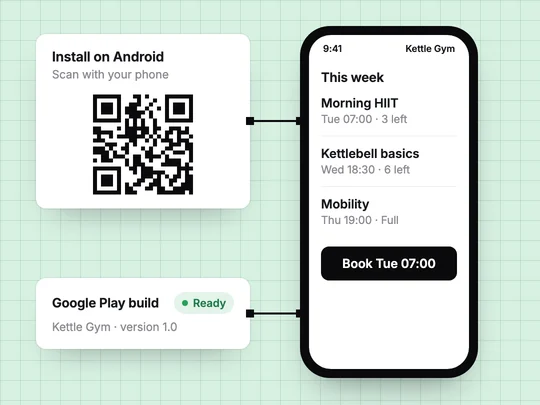
To turn your website into an Android app with ExaSpark, open the project and ask for it: "Make it an Android app." The app comes from the same project as the website, with the same data and sign-in, so a booking made on the phone shows up on the web and the other way round. You test it with an install link and a QR code, and when it is ready, you get a build prepared for Google Play.
Why turn a website into an Android app?
Because some customers come back often enough to want you on their home screen: members booking classes every week, clients checking their orders, players reserving courts. For them, an app is one tap instead of a search. If most visitors come once, from a search or an ad, the website is enough, and an app only adds a store listing and a testing period to look after. Compare visits with visitors in your analytics: when the same people come back several times a month, an app is likely to earn its place. Web app vs mobile app vs PWA covers that decision in more detail.
What do you get when your website becomes an app?
| Website | Android app from the same project | |
|---|---|---|
| How people get it | Open a link | An install link with a QR code, or Google Play |
| Where it lives | In the browser | On the phone's home screen |
| Data | Your app's database | The same database |
| Sign-in | Google, Apple or email | The same accounts |
| Best for | Anyone, from any device | Customers who come back often |
One project means one set of customers, bookings and sales. You do not run two products that slowly drift apart, and your numbers stay in one place.
How do you turn a website into an Android app step by step?
Start from a website that works
Sign-in, the main action and payments should already work in a phone's browser. The app keeps them.
Ask for the Android app
In your project, ask "Make it an Android app." See Android apps.
Install it with the QR code
Scan the code on your own phone and on a few testers' phones. Sign in with the account you use on the website and check that your data is there.
Test the main path on the phone
Sign in, book or buy, sign out, sign in again. Note anything that feels like a web page squeezed onto a small screen, and ask for the change.
Prepare the Google Play build
When testers use it without help, get the build that is ready for Google Play and upload it in the Play Console.
Expect a few changes in the testing round. What is fine on a laptop can be awkward in an app: long forms, small buttons, tables that do not fit the screen. Ask for them one at a time, the same way you changed the website.
What does Google Play require?
Google sets these rules and changes them from time to time, so read its pages before you start. As listed in October 2026:
- A developer account. Google Play charges a US$25 one-time registration fee and asks you to verify your identity when you set the account up.
- A closed test for new personal accounts. Personal developer accounts created after November 13, 2023 must run a closed test with at least 12 testers who have been opted in continuously for at least 14 days before applying for production access. Plan for those two weeks; the people who tried your install link are a natural group to invite.
- App content declarations. In the Play Console, Google asks for a content rating, the app's target audience, whether it shows ads and, when part of the app needs sign-in, login details its reviewers can use. Apps that access sensitive data need a privacy policy linked in the listing and in the app. See Prepare your app for review.
What about customers on iPhone?
The app ExaSpark makes is for Android. Customers on iPhone use the website in their phone's browser, signed in to the same account, so they see the same bookings and history. Make sure the website works well on a small screen before you build the app; it serves everyone who does not install it.
If your website already has returning customers, this request turns it into an app you can test today:
Make my class booking website an Android app: members sign in with the same account, see this week's classes, book a spot and see their bookings, with a QR code so I can install it for testing.
Frequently asked questions
- Can I turn my website into an Android app without coding?
- Yes. In ExaSpark you ask for it in your project, and the Android app is built from the same project, with the same data and sign-in, an install link with a QR code and a build ready for Google Play.
- How much does it cost to publish an app on Google Play?
- Google Play charges a US$25 one-time registration fee for a developer account, according to its help page in October 2026.
- Do I need testers before publishing on Google Play?
- If your personal developer account was created after November 13, 2023, yes. Google requires a closed test with at least 12 testers opted in continuously for at least 14 days before you can apply for production access.
- Will my website and my Android app share the same accounts?
- With ExaSpark, yes. Both come from one project, so customers sign in with the same account and see the same data on the web and in the app.

