User roles and permissions explained, with examples
What roles and permissions are, how to design them for a small business app, the principle of least privilege, and how to test them before launch.
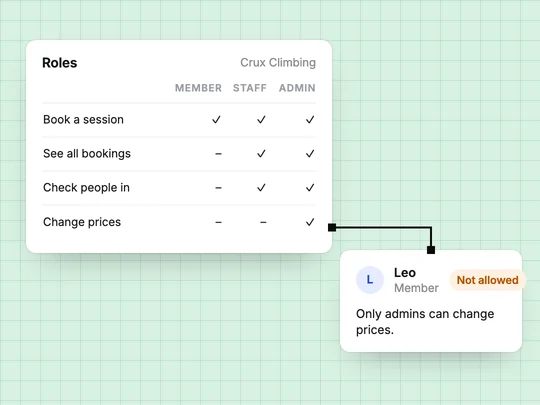
Roles and permissions decide what each person can do in your app once they are signed in. A permission is one allowed action, such as "edit the class schedule". A role is a named bundle of permissions, such as member, staff or admin, that you give to people instead of granting each action one by one. Sign-in tells the app who someone is; roles and permissions decide what happens next. How sign-in works covers the first half.
What is the difference between a role and a permission?
A permission is the smallest unit: view a booking, cancel a booking, refund a payment, change a price. A role groups the permissions one kind of person needs. When a new coach joins, you give them the staff role rather than ticking twenty boxes, and when you change what staff may do, everyone with that role changes at once.
| Permission | Role | |
|---|---|---|
| What it is | One allowed action | A named set of permissions |
| Example | Refund a payment | Admin |
| Changes when | The app gains or loses a feature | Someone joins, leaves or changes job |
Which roles does a small business app need?
Fewer than you might expect. Most booking sites, shops and client portals work with four, and every extra role is one more thing to test. A climbing gym's booking app might use these:
| Action | Visitor | Member | Staff | Admin |
|---|---|---|---|---|
| See the timetable and prices | Yes | Yes | Yes | Yes |
| Book and pay for a session | No | Yes | For a member | Yes |
| See bookings | No | Their own | Everyone's | Everyone's |
| Check people in | No | No | Yes | Yes |
| Change prices and refund payments | No | No | No | Yes |
| Give someone a role | No | No | No | Yes |
Two rows carry most of the risk: members see only their own bookings, and only admins touch money and roles.
What is the principle of least privilege?
It is the rule that each person, and each piece of software, gets the minimum access its job needs. NIST's glossary describes it as restricting access "to the minimum necessary to accomplish assigned tasks". In a small business app that means:
- Every new account starts with the lowest role, and you raise it on purpose.
- Front-desk staff get what the front desk needs, not the admin role because it is quicker.
- Admins stay few, and access goes the day someone leaves.
- Tools follow the same rule: a key or an integration reaches only the data it uses.
As the business grows, roles sometimes need a second rule about whose records a person may see: a coach who sees only their own classes, or staff who see only their own location. Describe those rules the same way, in terms of which records each person may open.
Why must permissions be checked on the server?
Because anything in the browser can be changed by the person using it. Hiding the Refund button from members is good design, but if the server would still accept a refund request from a member, the button was never the protection. Broken access control is the first entry in the OWASP Top 10, the security community's list of the most serious risks to web applications, and one of its examples is opening someone else's account by changing the ID in a request.
OWASP's authorization cheat sheet adds two rules worth adopting: deny by default, and check permissions on every request, not only when a page first loads.
How do you test roles and permissions before launch?
Create one test account per role
Two members, a staff account and an admin.
Sign in as each and walk the main paths
Book, cancel, check in, change a price. Note anything a role can do that it should not.
Open the other member's records
Signed in as one member, open a link to the other member's booking. You should see an error, not their booking.
Sign out and try again
Members-only pages should send a visitor to sign in.
Check again after each new feature
Every new page or action needs its own rule, and an old test will not cover it.
How do you set up roles in an app without code?
Describe them in the plain words you would use with a new employee. In ExaSpark, people sign in with Google, Apple or email, the app gets its own database, and roles for members and admins follow from requests such as "only admins can edit the class schedule". See Accounts and data.
The project itself has roles too. Teammates you invite to ExaSpark are builders, who can change the app, or viewers, who can look around, and the number of builders depends on your plan. Least privilege applies here as well: builder access for the people who change the app, viewer access for everyone else. See Working with a team.
To start with clear roles from the first version:
A booking app for my climbing gym with three roles: members book and pay for sessions and see only their own bookings, staff see all bookings and check people in, and only admins change prices and give people roles.
Frequently asked questions
- What is the difference between roles and permissions?
- A permission is one allowed action, such as cancelling a booking. A role is a named set of permissions, such as staff or admin, that you give to a person.
- What is the principle of least privilege?
- It means giving each person or tool only the access needed to do its job, starting from no access and adding what is required.
- Is hiding a button enough to stop users doing something?
- No. The server must check permissions on every request, because anything in the browser can be changed by the person using it.
- How many roles should my app have?
- As few as your business needs. Many small business apps work with four: visitor, member, staff and admin.

