Website accessibility basics: a checklist for small businesses
What web accessibility means, the WCAG 2.2 basics that matter most, and a checklist you can run on your own website without code.
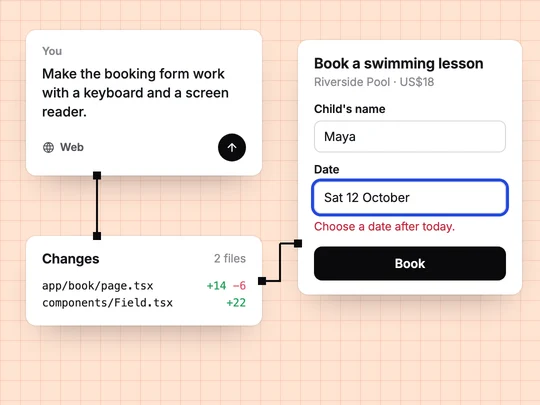
Web accessibility means people can use your website whatever their abilities or the way they browse: with a screen reader, with a keyboard instead of a mouse, zoomed in, or with captions. Most of it comes down to a few habits: text that stands out from its background, images with descriptions, forms with labels, and everything reachable by keyboard. The same habits help far more people than they are aimed at, from someone reading a phone in bright sun to a customer with a broken wrist.
What is WCAG?
The Web Content Accessibility Guidelines are the W3C's standard for accessible web content. The current version, WCAG 2.2, was published in October 2023 and updated in December 2024 (W3C). Its success criteria come in three levels, A, AA and AAA, and AA is the level most commonly targeted.
What are the accessibility basics every website needs?
| Basic | What WCAG 2.2 asks | How to check it |
|---|---|---|
| Text contrast | At least 4.5:1 for normal text and 3:1 for large text (AA) | A contrast checker; text over photos is the usual culprit |
| Images | A text alternative for images that carry meaning (A) | Read each image's alt text: does it say what the image shows? |
| Keyboard | Everything works from a keyboard (A) | Put the mouse away and use Tab, Enter and Space |
| Visible focus | You can always see where the keyboard is (AA) | Tab through the page: is the highlight always visible? |
| Forms | Labels or instructions for every input (A) | Every field has a visible label, not only placeholder text |
| Zoom | Text resizes to 200% without losing content (AA) | Zoom the browser to 200% and use the page |
| Tap targets | At least 24 by 24 CSS pixels, with exceptions (AA) | Tap the small links on a phone |
The criteria and numbers come from WCAG 2.2 itself; the letters show each one's level.
How do you write good alt text?
Describe what the image tells a sighted visitor, in a sentence. "An instructor holding a child's hands as she floats on her back in the shallow end" helps; "swimming lesson image" does not. Decorative images, such as a background pattern, get empty alt text so screen readers skip them. Google's guidance on images recommends useful alt text too, and warns against filling it with keywords.
How do you make forms accessible?
- A visible label for every field. Placeholder text disappears as people type.
- Errors in words, next to the field. "Choose a date after today", not only a red border.
- The right input type, so phones show a number pad for phone numbers and a date picker for dates.
- Enough time. Do not sign people out of a long form without warning.
Is website accessibility a legal requirement?
In some countries and sectors, yes, and the rules differ by place and by the kind of business, so check what applies where you operate and sell. A sound default is to meet WCAG 2.2 Level AA on the pages customers depend on: booking, buying and contacting you. This is general information, not legal advice.
How do you make an accessible site with ExaSpark?
Ask for it in plain words, as you would any other requirement: "make the booking form work with a keyboard and a screen reader, with visible labels and clear error messages". Then check the result with the steps above; no builder can judge content only you know, such as what each of your photos shows. Every change is kept as a version, so you can try a fix and go back if it breaks something. See Publish and custom domains, and What is responsive design? for the phone side of the same work.
For a booking form, the request could be:
Make the swimming lesson booking form accessible: a visible label on every field, errors written next to the field, a date picker for the date, everything usable with a keyboard, and alt text for every photo that says what it shows.
Frequently asked questions
- What is web accessibility?
- Making a website usable by people with disabilities and with different ways of browsing, such as screen readers, keyboards, zoom and captions.
- What is WCAG 2.2?
- The W3C's Web Content Accessibility Guidelines, published in October 2023 and updated in December 2024. Its criteria have three levels, and Level AA is the one most commonly targeted.
- What contrast ratio does WCAG require?
- At Level AA, at least 4.5:1 for normal text and 3:1 for large text.
- How can I test my website's accessibility without code?
- Use only the keyboard, zoom the browser to 200%, read the alt text of your images, check that every form field has a visible label, and run a contrast checker on your text colours.

