What is responsive design, and how do you check your site on every screen?
Responsive design explained: one site that adapts to phones, tablets and laptops, why it matters for visitors and Google, and how to check yours.
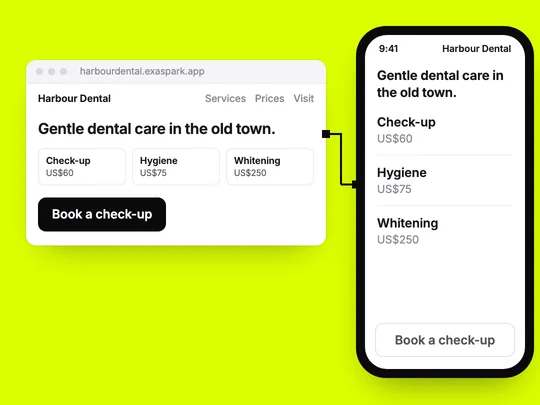
Responsive design is building one website that rearranges itself for the screen it is on. On a laptop, your services might sit three across; on a phone, the same services stack in one column, the menu folds behind a button, and the text stays readable without zooming. MDN describes it as an approach that makes pages render well on all screen sizes while staying usable (MDN).
Why does responsive design matter?
Because visitors use whatever is in their hand, and Google reads your site the way a phone does: it uses the mobile version of a site's content, crawled with a smartphone agent, for indexing and ranking (Google Search Central). A site that only works on a laptop loses the people who find you on the way somewhere, and the version Google reads is the one that does not work.
How does responsive design work?
- A viewport setting tells phones to lay the page out at their own width instead of shrinking a desktop page. MDN's viewport reference recommends setting it to the device's width.
- Flexible layouts let columns grow, shrink and wrap instead of keeping fixed widths.
- Breakpoints are the screen widths where the layout changes, written as CSS media queries: three columns become one.
- Flexible images scale with their container, and the browser can pick a smaller file for a smaller screen.
What should you check on a phone?
| Check | Good | Common problem |
|---|---|---|
| Text | Readable without zooming | Tiny text carried over from the desktop layout |
| Buttons and links | Easy to tap without hitting the wrong one | Links packed together in the footer |
| Width | Nothing wider than the screen | A table or image that makes the page scroll sideways |
| Menu | Opens and closes with one tap | A menu that covers the page and will not close |
| Forms | The right keyboard for each field, labels visible | A phone number field that opens the letter keyboard |
| Images | Sharp, but not huge files | Desktop-sized photos downloaded on mobile data |
For tap targets there is a number to aim for: WCAG 2.2, the web's accessibility standard, asks for targets of at least 24 by 24 CSS pixels, with some exceptions (W3C). Bigger is easier for everyone. Website accessibility basics covers the rest of that standard.
Is a responsive website the same as a mobile app?
No. A responsive website is still a website: people open it from a link, and it adapts to their screen. A mobile app is installed on the phone. Many businesses never need one; those whose customers come back several times a week may. Web app vs mobile app vs PWA covers that decision.
How do you check responsive design in ExaSpark?
Before anything is built, the design canvas lets you check desktop and phone sizes side by side. See Design on the canvas. After publishing, open every page on your own phone and ask for fixes in plain words, one at a time: "on phones, put the booking button above the photos". What to put on your homepage helps decide what comes first on a small screen.
To see both sizes before you build:
A homepage for my dental clinic in desktop and phone sizes: a Book a check-up button that stays visible on phones, our services with prices, opening hours, and the address with a map link.
Frequently asked questions
- What is responsive design in simple terms?
- A website whose layout adapts to the screen it is viewed on, so the same site works on a phone, a tablet and a laptop.
- Does responsive design affect SEO?
- Google uses the mobile version of a site's content for indexing and ranking, so a site that works poorly on phones is judged on that version.
- How do I test if my website is responsive?
- Open every page on a real phone and check that text is readable without zooming, buttons are easy to tap, nothing scrolls sideways and forms are easy to fill in. Then check a laptop too.
- Is a responsive website the same as an app?
- No. A responsive website opens from a link and adapts to the screen. An app is installed on the phone.

