What to put on your homepage: a section-by-section guide
What a small business homepage needs, from the first screen to the footer, what to leave out, and how to tell whether it is doing its job.
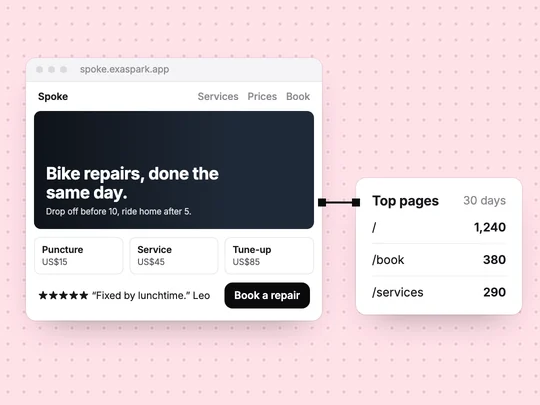
Your homepage has one main job: to tell a visitor who has never heard of you what you do, who it is for and what to do next, before they scroll. Everything below supports that decision: what you offer, why to trust you, and the practical details people check before they buy. A homepage that tries to say everything says nothing clearly.
What should be on the first screen?
- A headline that says what you do. "Bike repairs, done the same day" beats "Welcome to Spoke".
- One line on how it works or why you. "Book online, drop off before 10, ride home after 5."
- One main button. The action most visitors should take: book, order or ask for a quote.
- A real photo of your work, your place or your product.
Which sections does a small business homepage need?
| Section | The visitor's question | Keep it to |
|---|---|---|
| First screen | What is this, and what do I do? | A headline, one line, one button |
| Services or products | Do you have what I need, and for how much? | Three to six, with prices or starting prices |
| Proof | Can I trust you? | Two or three reviews, facts you can stand behind |
| How it works | What happens after I click? | Three steps |
| Practical details | Where, when, how long? | Address, hours, area served, turnaround |
| Footer | How do I reach you, and who are you? | Contact, social links, terms and privacy |
The order follows the visitor's questions: am I in the right place, do you have what I need, can I trust you, how do I start. Put the main button again after the proof, where the people who scrolled have made up their minds.
What should you leave off your homepage?
- Sliders and carousels. Anything on the second slide is easy to miss, so keep the main message on a fixed first screen.
- A long welcome or company history. Put it on an About page and link to it.
- Every service in full. Summarise here and give each service its own page; How to get a new website found on Google and in AI answers explains why that also helps search.
- Several competing buttons. One main action, and at most one quieter one, such as "See prices".
How is a homepage different from a landing page?
A homepage serves everyone who arrives: new customers, returning ones, people checking your hours. A landing page serves one offer for the visitors one ad or post sends. If you run ads, send them to a landing page that matches the ad and keep the homepage for everyone else. How to build a landing page covers the other side.
How do you know if your homepage works?
See where visitors go after it. Compare visits to the homepage with visits to your services and booking pages: if few people get past the homepage, read it again as a stranger would. In ExaSpark every site shows visitors and top pages, so the comparison is there from the first day. See Visitors and performance. A cheaper second test: show the page for ten seconds to three people who do not know your business, then ask what you do.
To build one, describe the business, the main action and the sections in one request, then compare design directions on the canvas and pick one. How to create a website with AI walks through the whole process. For a bike repair shop, the request could be:
A homepage for my bike repair shop: the headline "Bike repairs, done the same day", a Book a repair button, four services with prices from $15, three customer reviews, how it works in three steps, our address and opening hours, and a footer with contact details, terms and privacy.
Frequently asked questions
- What should be on a homepage?
- A first screen that says what you do with one main button, your services or products, proof such as reviews, how it works, practical details like hours and location, and a footer with contact and legal links.
- How long should a homepage be?
- Long enough to answer a first-time visitor's questions in order, and no longer. Detail belongs on separate pages linked from the homepage.
- Should my homepage have a slider?
- Usually not. Anything on the second slide is easy to miss, so put the main message on a fixed first screen.
- What is the difference between a homepage and a landing page?
- A homepage serves every visitor and helps them find their way. A landing page serves one offer for the visitors a particular ad, post or email sends, and asks for one action.

