How to create a website with AI, step by step
How to create a website with AI: what to prepare, how to describe it, choosing a design, checking it on a phone, and publishing on your own domain.
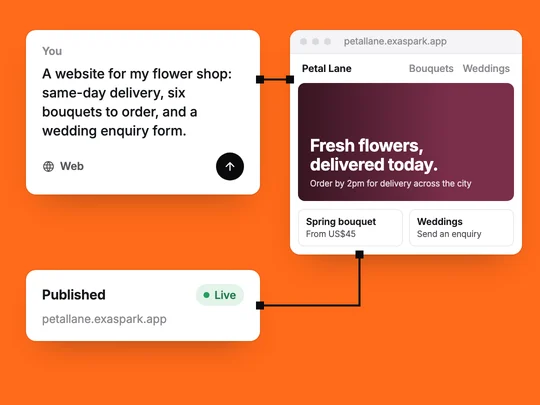
Creating a website with AI takes three things from you: the facts about your business, a clear description of the site, and your judgement on the result. You describe the site in plain words, and an AI website builder writes the pages, lays them out and publishes them to a link. Most of your time goes into what only you can supply: what you sell, what it costs and what a visitor should do next.
What do you need before you start?
- Who the site is for and what they should do. "Couples planning a wedding send an enquiry" is a goal; "look professional" is not.
- The facts. Products or services, prices, opening hours, the area you serve, how to reach you.
- Words you already have. A price list, a brochure, your social profiles. Attach them rather than retyping them.
- Photos of your own work. A few good ones do more than a page of stock images.
- A sense of the look. A site you admire, or three words: warm, simple, bold.
How do you describe a website to an AI?
In one message, say what the business is, who visits, which pages you need and what each page must do. Name the one action that matters most and the facts that must appear. Leave out what you have not decided: a gap is better than an invented price.
| Vague | Specific |
|---|---|
| A website for my flower shop | A website for my flower shop, with same-day delivery across the city |
| Show my bouquets | Six bouquets with photos and prices, that customers can order and pay for |
| Add a contact page | A wedding enquiry form asking for the date, the venue and the budget |
| Make it look nice | Soft colours, plenty of white space, large photos |
Write a good request has the same checklist, and How to describe an app so AI builds the right one goes further.
How do you choose a design?
Ask for a few directions before anything is built. In ExaSpark, design directions appear side by side on a canvas: you compare them, click any part to change it, check desktop and phone sizes, and build from the one you pick. See Design on the canvas. Choosing between three real options is faster than describing a look from nothing.
How do you check the site before you publish?
Read every word
AI writes fluent text, which makes mistakes easy to miss. Check every price, time, address and promise.
Open it on a phone
Tap every button, open every page and fill in every form. What is responsive design? lists what to look for.
Try the main action as a customer
Send an enquiry or place an order, and check that it reaches you.
Change one thing at a time
One change per message, checked before the next, so you know what fixed what.
How do you publish and connect a domain?
Publish to a free address first and share it with a few people for feedback. Before it goes on your business cards or into an ad, connect your own domain. In ExaSpark, every site publishes to a free exaspark.app link, paid plans connect your own domain, and publishing again after a change updates the same address. Every change is kept as a version you can go back to. See Publish and custom domains and What is a domain name?
What can AI not do for your website?
It cannot know your prices, your promises or your customers. It will write a confident sentence about same-day delivery whether or not you offer it, so every fact on the page is yours to confirm. Nor can it tell you whether the site works for the business; that shows in enquiries and orders over the following weeks. What to put on your homepage covers the first page people see, and How to get a new website found on Google and in AI answers covers being found.
A first request for a small shop can look like this:
A website for my flower shop: a homepage that leads with same-day delivery across the city, six bouquets with photos and prices that customers can order and pay for through Stripe, a wedding enquiry form asking for the date, venue and budget, and our opening hours. Soft colours and large photos.
Frequently asked questions
- Can AI build a whole website?
- Yes. An AI website builder can write the pages, lay them out and publish them from a description. You still supply and check the facts: products, prices, hours and contact details.
- Do I need to know how to code to create a website with AI?
- No. You describe the site in plain words and change it one request at a time.
- How long does it take to create a website with AI?
- A first version can be ready in minutes. The words, photos and checks that make it ready for customers take longer, and they are yours to do.
- Can I use my own domain for a website made with AI?
- With ExaSpark, yes, on paid plans. Every site also gets a free exaspark.app link.

