How to build a portfolio website that gets you work
What a portfolio website must do to win work: a few strong projects with the problem and the result, who you help, and an easy way to get in touch.
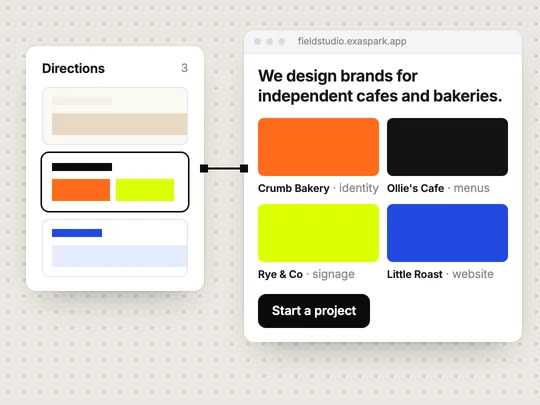
A portfolio website gets you work when a potential client can tell, within a minute, what you do, who you do it for, and that you have done it well before. That means a few strong projects with the story behind each one, a clear line about the clients you serve, and an easy way to get in touch. Most portfolios fall short by showing too much and explaining too little.
What should a portfolio website include?
| Section | What it does | Keep it to |
|---|---|---|
| First screen | Says what you do and for whom | One sentence and one button |
| Selected work | Shows your strongest projects | Three to six |
| A page per project | Tells the problem, your part and the result | A few short paragraphs and the key images |
| About | Explains how you work and why to trust you | A short page with a photo |
| Services or rates | Sets expectations before the first call | What you offer and where prices start |
| Contact | Turns interest into a message | A short form or a way to book a call |
Saying where your prices start saves both sides a call that was never going to work. If your projects vary too much for that, describe a typical project and how long it takes. On the contact form, ask only for what you need to reply well, such as the budget, the timeline and a link to their business.
How many projects should a portfolio show?
Fewer than you think. Three to six projects that match the work you want next do more than twenty that cover everything you have done. If you want more brand identity work and less social media, lead with brand identity even if social media paid the bills last year. Every project you show tells clients what to hire you for.
How do you write a project page?
The client and the problem
Who it was for and what was not working: "A family bakery whose online orders stalled at the checkout."
What you did
Your part in plain words, including the options you ruled out and why.
The result
What changed, with numbers if the client agrees to share them, or a short quote from them.
The work itself
Large images or a short video of the finished result, with a sentence of context under each.
Describe each image in its alt text: what it shows, in a sentence. Google's guidance on images in search recommends useful alt text and warns against filling it with keywords, and the same text helps people who use screen readers.
Should a portfolio have its own domain?
Yes, once you send it to clients. A name such as yourname.com is easy to say, looks professional on a proposal, and stays yours if you change tools. A profile on a portfolio platform is fine for starting out; your own site lets you decide what comes first and how people contact you. What is a domain name explains how to connect one.
How do you build a portfolio website with ExaSpark?
Gather your projects
For each one, a few images and three sentences: the problem, what you did, the result.
Ask for design directions
Describe the feel you want and compare two or three directions on the canvas. See Design on the canvas.
Build the direction you pick
Ask for a page per project, an about page and a contact form.
Make extra shots if you need them
If you have only one good photo of a product you designed, ExaSpark can turn it into a set of shots and a short video. See Images and video.
Publish
Share the free exaspark.app link, then connect your own domain on a paid plan. See Publish and custom domains.
What makes clients leave a portfolio?
- Still not knowing what you do after the first screen.
- Clicking through images with no word about the problem or the result.
- Slow pages full of oversized images, especially on a phone.
- No clear next step, or a contact form that asks for too much.
- Old work at the top that no longer looks like what you do now.
To check yours, send the link to two people who hire for your kind of work and ask them, after one minute, what they think you do. If clients should also find you through search, How to get a new website found on Google and in AI answers covers the basics.
Describe the clients you want and the projects you are proudest of:
A portfolio website for my brand design studio: a first screen saying we design brands for independent cafes and bakeries, five projects each with its own page telling the problem, our work and the result, an about page, and a contact form asking for budget and timeline. Calm and minimal, with large images.
Frequently asked questions
- What should I put on my portfolio website?
- A first screen that says what you do and for whom, three to six of your best projects with a page each, a short about page, what you offer, and a simple way to get in touch.
- How many projects should be in a portfolio?
- Three to six that match the work you want next. A few strong projects with the problem and result explained do more than a long gallery.
- Do I need my own domain for a portfolio?
- It is worth it once you send the site to clients. Your own domain is easy to remember, looks professional and stays yours if you change tools.
- Can I build a portfolio website without coding?
- Yes. With ExaSpark you describe the site, compare design directions on a canvas, build the one you pick, and publish it to a free link or your own domain.

