How to build a restaurant website people actually use
What a restaurant website needs: the menu as text, hours, location, bookings or orders and a number to tap, and how to build one step by step.
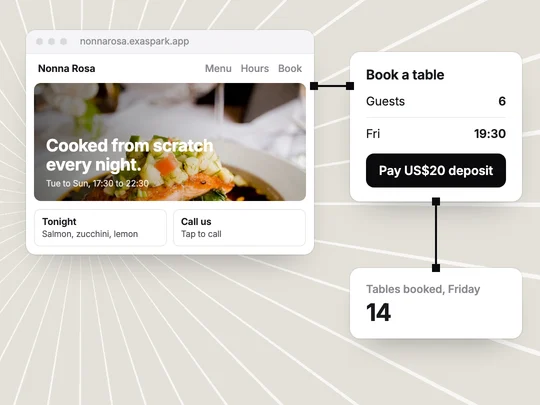
A restaurant website people actually use answers four questions within seconds on a phone: what is on the menu, when are you open, where are you, and how do I book or order. The story, the photos and the press come after. Get those four right, keep them the same as your Google listing, and the site does its job.
What should a restaurant website include?
| Part | What to put there | Common mistake |
|---|---|---|
| Menu | Dishes, short descriptions and prices as text, with dietary labels | A PDF that needs zooming on a phone |
| Hours | Every day of the week, plus holiday changes | Hours that differ from your Google listing |
| Location | The address, a map link, parking or transit notes | An address that only appears in an image |
| Book or order | One clear button, visible on every page | A booking link hidden in the footer |
| Phone | A number people can tap to call | No number at all, or one that cannot be tapped |
| Photos | A few real dishes and the room | Stock photos that do not look like your food |
Why should the menu be text, not a PDF?
Because most people check it on a phone, often on the way to you. A text menu fits the screen, loads quickly and can be changed the day a dish changes. Search engines can read it too, so someone searching for a dish nearby can land on your page. Keep photos for the dishes you are proudest of, and write a short description under each one rather than relying on the image. Mark dishes that are vegetarian or gluten-free and say how guests can ask about allergens, so people with dietary needs can choose before they arrive.
Should a restaurant take bookings or orders on its own website?
If you take reservations or sell takeaway, yes. The decision is how much to build. Three common setups:
- A booking request. Guests choose a date, a time and the number of people; staff confirm. Simple, and enough for many small restaurants.
- A booking with a deposit. Guests pay part of the bill when they book, through a hosted checkout such as Stripe's. Useful for large groups and special evenings, where an empty table costs the most.
- Orders for pickup. Guests choose dishes and pay online, and the kitchen sees a list of orders with pickup times.
Whichever you choose, state the rules before anyone pays: what the deposit covers, until when guests can cancel, and what happens if they do not come. How to build a booking app goes deeper into availability and cancellations, and How online payments work explains what happens behind the checkout.
Do you need a Google Business Profile as well as a website?
Yes. Many diners meet you first on Google Maps or in search, where your Business Profile shows your hours, photos, reviews and a link to your site. Google lets you add or claim a Business Profile at no charge, with a verification step. Keep its details the same as your website's. Google's guidance for its AI search features also asks businesses to keep Business Profile information current, so a wrong opening time can follow you into more places than one.
How do you build a restaurant website with ExaSpark?
Collect what you have
The menu with prices, opening hours, address, phone number, logo and a few photos. Attach them to your request; a photo of the printed menu works.
Ask for design directions
Ask for two or three directions and compare them side by side on the canvas. See Design on the canvas.
Build the one you pick
Ask for a website with the menu as text, a booking form, a map link and a tap-to-call button.
Add deposits or orders if you need them
Name the amount, such as a $20 deposit for groups of six or more, and ExaSpark adds Stripe checkout. See Payments.
Check it on a phone
Open every page, make a test booking, tap the phone number and follow the map link.
Publish on your own domain
Publish to a free exaspark.app link first, then connect your own domain on a paid plan. See Publish and custom domains.
What should you check before you share it?
- The hours and address match your Google Business Profile.
- The prices on the site match the prices in the restaurant.
- A test booking reaches the person who confirms bookings.
- Payments are live, not in test mode, and you know how to refund one.
- The pages load quickly on a phone with a weak connection.
After launch, update the site on the day the menu or the hours change. A wrong closing time costs you the guest who made the trip.
Start with the menu you already have and let the site grow from it:
A website for my neighborhood Italian restaurant: the menu as text with prices and dietary labels from the attached photo, opening hours, a map link, a tap-to-call button, and table bookings with a $20 deposit through Stripe for groups of six or more.
Frequently asked questions
- What should be on a restaurant website?
- The menu as text with prices, opening hours for every day, the address with a map link, a phone number people can tap, a way to book or order, and a few real photos of the food and the room.
- Should I put my restaurant menu online as a PDF?
- Not only as a PDF. A text menu fits a phone screen, loads faster, is easier to update and can be read by search engines. Offer the PDF as an extra if you like.
- Can a restaurant website take deposits for bookings?
- Yes. A hosted checkout such as Stripe's can take a deposit when the guest books. State what the deposit covers and the cancellation rules before they pay.
- Do I still need a Google Business Profile if I have a website?
- Yes. Many diners find restaurants on Google Maps and in search, where the Business Profile shows hours, photos, reviews and a link to your site. Google lets you add or claim one at no charge.

