How to build a booking app for your business
What a booking app needs: services, availability, sign-in, deposits, cancellation rules and a staff view, and the steps to build one.
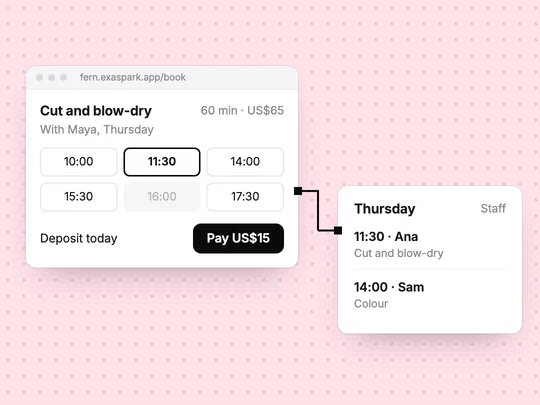
To build a booking app, define what people book, when it is available and what they pay, then let customers sign in to book and manage their own bookings while staff see the whole schedule. The calendar on the screen is the easy part. The rules underneath, such as no double bookings, deposits and cancellations, are what make it work for a real business.
What does a booking app need?
| Part | What it holds | Example: a hair salon |
|---|---|---|
| Services | What can be booked, how long it takes, the price | Cut, 45 minutes, $55 |
| Availability | When each service or person is free | Maya: Tuesday to Saturday, 9am to 5pm |
| Bookings | Who booked what, when, and its status | Sam, cut with Maya, Friday 10am, deposit paid |
| Customers | Name, contact details, past bookings | Sam, two visits this year |
| Rules | Deposits, the cancellation window, booking limits | $15 deposit, free cancellation until 24 hours before |
Two rules are easy to forget. Buffer time between appointments lets a stylist clean up before the next client. A limit on how far ahead people can book stops the calendar filling up months out before you have entered holidays. Put both in your description.
How do bookings differ between types of business?
| Business | What is booked | What matters most |
|---|---|---|
| Gym or studio | A place in a class | Class capacity and a waitlist |
| Salon or clinic | Time with a particular person | Each person's hours and the length of each service |
| Tutor or coach | A session, often repeating | Recurring slots and packages of sessions |
| Court or room hire | A resource for a period | No overlaps, and different prices at peak times |
Say which of these you are when you describe the app. "Members book a place in a class of 12" and "clients book a 45-minute slot with a stylist" lead to different data and different screens.
Should customers pay when they book?
It depends on what a no-show costs you. Three common choices:
- Pay later. Simplest for customers. Works when no-shows are rare or the slot is easy to fill again.
- A deposit at booking. Part of the price, paid by card through a hosted checkout. It discourages no-shows without asking for the full amount upfront.
- Full prepayment. Common for classes, workshops and court hire, where a place cannot be resold at short notice.
Write the cancellation rule next to the Book button and again in the confirmation: until when people can cancel, and whether they get the deposit back. A rule people saw before paying prevents most disputes. How online payments work explains what happens behind the checkout.
What should customers and staff each be able to do?
Customers see the services, book, pay, and see or cancel their own bookings. Staff see the day's schedule and everyone's bookings, and change availability. Admins also change prices and rules. Design the staff view of today first: bookings in time order, with who has paid. It is the screen staff will open most. Set these permissions up as roles, and check that one customer can never open another customer's booking. User roles and permissions explains how to think about this, and Accounts and data shows how sign-in and roles work in ExaSpark.
How do you build a booking app step by step?
Write the rules on one page
Services with their lengths and prices, opening hours, deposit and cancellation rules, and who confirms bookings.
Describe it to ExaSpark
Say who books, what they book, what they pay and what staff need to see, in your own words: "a class of 12 with a waitlist".
Try the impossible cases
Book a full class, book the same slot twice, open another customer's booking. Each should fail with a clear message.
Add payments
Name the amount, such as a $15 deposit, and ExaSpark adds Stripe checkout. See Payments.
Test with a few real customers
Ask three regulars to book through it while you watch where they hesitate.
Publish and put the link where customers look
On your own domain, in your Google Business Profile and in your social profiles.
When is a ready-made scheduling tool enough?
If you need one calendar for one person and a payment link, a scheduling tool may do the job. Build your own when booking is part of something bigger: memberships, packages of sessions, a members area, your own brand, or data you want in one place with your sales and visitors. How to build a membership website covers the step after bookings for many studios and clubs.
Start with the services and rules you already use, and adjust from there:
A booking app for my hair salon: clients sign in with Google and book a service with a stylist, each service has a length and a price, a $15 deposit through Stripe, free cancellation until 24 hours before, clients see only their own bookings, and staff see the day's schedule.
Frequently asked questions
- What features does a booking app need?
- Services with lengths and prices, availability, the bookings themselves, customer accounts, and rules for deposits and cancellations, plus separate views for customers and staff.
- How do I stop double bookings?
- The rule has to be enforced where bookings are saved, not only on the screen: the app should refuse a booking when the slot or the class is already full. Test it by trying to book the same slot twice.
- Should I charge a deposit for bookings?
- Charge one when a no-show costs you money that you cannot recover, such as a stylist's empty hour or a class place that cannot be resold. State the cancellation rule before people pay.
- Can I build a booking app without coding?
- Yes. With an AI app builder such as ExaSpark you describe the services, availability, payments and roles in plain words, and it builds the app with sign-in, a database and Stripe checkout.

