Common vibe coding mistakes, and how to avoid them
The mistakes that slow down apps built with AI, from vague first requests to test payments left on and secrets in the page, and what to do instead.
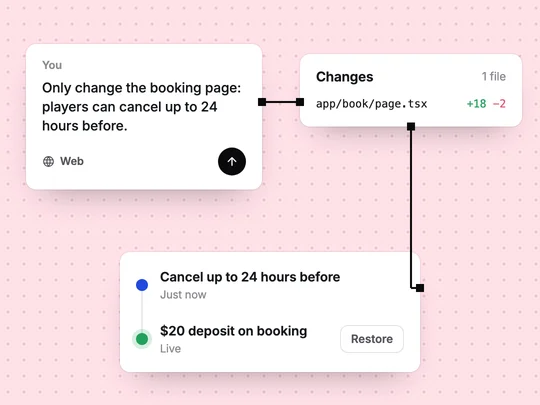
Vibe coding, building software by describing it to an AI, is fast enough that the usual mistakes have moved. The code rarely fails the way it used to. Projects go wrong because the request was vague, the changes got tangled, or nobody used the app the way a stranger would. What is vibe coding? covers the basics.
Why do vibe-coded apps go wrong?
Because the AI fills every gap in the request with a guess. A good guess saves you a step; a wrong one looks like a bug, and fixing it in later messages piles change on change. Most of the mistakes below either leave gaps or make them hard to undo.
| Mistake | What happens | Do this instead |
|---|---|---|
| Asking for everything at once | A broad, generic app where nothing is quite right | Start with the main flow, then add one feature per message |
| Describing data vaguely | Fields that don't match how your business works | Name what is saved: "bookings with a date, a time, a court and a name" |
| Several changes in one message | Hard to tell which change broke what | One change per message, checked before the next |
| No way back before a big change | A bad change you can't cleanly undo | Know which version was the last good one before you start |
| Testing only as the owner, on a laptop | Visitors and phones hit problems you never see | Test signed out, as a member and on a phone |
| Test payments left on at launch | Checkouts that take no money | Switch to live and watch the first real order arrive |
| Secret keys in the page | Anyone can read them and use your accounts | Keep secrets on the server; replace any that leaked |
| Building before talking to customers | Features nobody asked for | Test the offer with one page first |
How should you write the first request?
Describe the product, not the code: who uses it, what they do, what has to be saved, what they pay and how it should feel. Leave out what you don't know yet rather than inventing it. If the builder asks questions before it starts, answer them; each answer is one guess fewer. Write a good request has a checklist. A sketch, a logo or a menu attached to the request often says more than a paragraph.
How do you change an app without breaking it?
Ask for one change per message, and look at the result before asking for the next. "Make the header darker" and "add a page for coaches" are two messages, not one. When something breaks, say what you expected, what happened instead and on which page, rather than "it's broken".
Before a large change, such as a new kind of user or a redesign, make sure you can get back. In ExaSpark every change becomes a version, and you can go back in one click and choose which one is live; see Publish and custom domains. Write down which version was the last good one, so going back is a decision rather than a search.
What should you test before launch?
What a stranger will do, not what you did while building. The preview shows the app to its owner: already signed in, on a large screen. Customers arrive signed out, on a phone, and do things in an order you didn't plan.
- Open every page signed out, then as a member, then as an admin.
- Use the whole app on a phone, checkout included.
- Try what should fail: booking a full class, opening someone else's booking, paying twice.
- Switch payments to live before you launch, and check that the first real order arrives. Payments in Stripe's test environment are simulated and don't move funds, and Stripe's terms do not allow testing in live mode with real card details, so do your testing before you switch.
What security mistakes do vibe coders make?
Two are common and easy to avoid. The first is a secret key for a payment provider or another service, pasted into a request and ending up in the page, where anyone can read it. Secret keys belong on the server; if one has been exposed, revoke it in that service's dashboard and create a new one. ExaSpark's AI models need no API keys of your own, so there is one less key to handle.
The second is data that is hidden in the page but not protected on the server, so a member who edits a link can open someone else's records. Hiding a button is not a permission. App security basics has a short checklist that covers both, including what to do when a key has leaked.
Why talk to customers before adding features?
Because building is now the cheap part, it is tempting to add a feature every time you have an idea. Each one makes the app harder to explain, test and change. Before adding something, ask whether a customer asked for it or got stuck without it. If you can't name one, put it on a list and ship what you have. How to validate an app idea shows how to test demand with a single page.
A first request that avoids most of these mistakes names the people, the data, the payment and the rules, and stops there:
Build a booking site for my padel club: players sign in with Google, see free courts for the next 7 days and book a 90-minute slot with a $20 deposit through Stripe; each player sees only their own bookings, and only admins can change court times. Start with this flow only.
Frequently asked questions
- What is the most common vibe coding mistake?
- Asking for everything in one message. The AI fills the gaps with guesses, and fixing them takes longer than starting with the main flow and adding one feature at a time.
- How do I stop the AI from breaking my app?
- Ask for one change per message, check the result before the next one, and make sure you can return to the last good version before any large change.
- Is vibe coding secure?
- It can be, if you keep secret keys out of the page, make sure each user can reach only their own data on the server, and test the app signed out before launch.
- What should I test before launching a vibe-coded app?
- Test signed out, as each kind of user and on a phone, try what should fail, and switch payments to live only once testing in the test environment is done.

