How ExaSpark works: from one sentence to a live app
How ExaSpark works, step by step: describe an idea, get a working app with sign-in, data and payments, publish it, find customers and improve it.
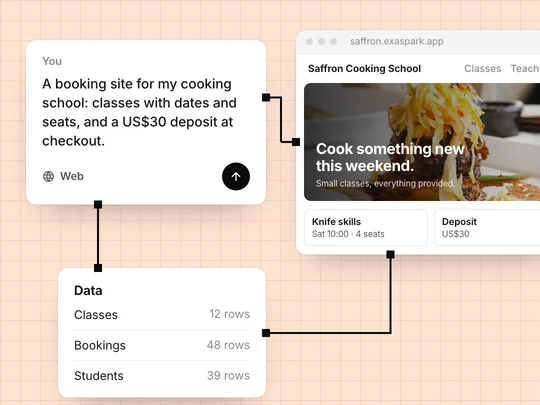
AI app builders work by reading a description as a product brief and generating what the product needs to run: pages, data, sign-in and settings. Below, we follow one request through ExaSpark, a booking site for a small cooking school, from the first sentence to paid bookings and what comes after.
How do AI app builders turn a sentence into an app?
They work out the product from the description. A cooking school that takes bookings needs classes with dates and seats, a way for students to book and pay, an account where students see their bookings, and an admin view for the school. ExaSpark works out those pieces and builds them together, so the first preview already behaves like a product rather than a mock-up.
Describe
Say what it is for, who uses it and what they do.
Shape
Answer a short question if something is unclear, or compare design directions on a canvas first.
Build
Pages, data and sign-in come together in the preview.
Publish
Go live on a free exaspark.app link or your own domain.
Get paid
Take deposits, one-off payments or subscriptions with Stripe checkout.
Grow
Run ads and watch visitors, sign-ups and revenue.
Improve
Change one thing at a time; every version is kept.
What should the first message say?
What the app is for, who uses it, what they do and how it should look. If anything has to be saved or paid for, say so, with the price.
A booking site for my cooking school: classes with dates and seats, a US$30 deposit at checkout, and a page where students see their bookings.
A logo, a menu or a sketch is often clearer than a paragraph, so attach one if you have it. If something important is unclear, ExaSpark asks a short question before it builds. Write a good request has more examples.
How does ExaSpark set up the database and sign-in?
From the nouns in your request. Classes, bookings and students become the app's data, and students and admins become roles. People sign up with Google, Apple or email. In the cooking school, students see only their own bookings and admins manage the timetable.
To add a field, describe it in plain words, such as "each booking has a date, a class and the student's name". ExaSpark turns that into the right structure.
How do you change and publish the app?
You describe changes one at a time. "Make the header warmer" or "Add a page for our teachers" works better than a long list, and every change is saved as a version you can go back to.
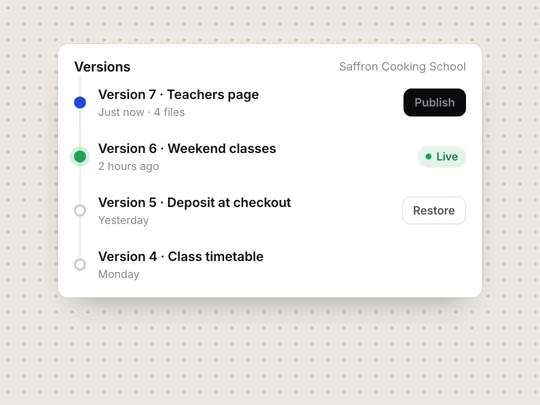
Publishing takes one click and gives you a free exaspark.app link. Paid plans add your own domain and remove the ExaSpark badge. The same project can also become an Android app, shared with a QR code or prepared for Google Play.
How do payments work in an ExaSpark app?
Tell ExaSpark what you sell and for how much, and it adds Stripe checkout for one-off payments or subscriptions. Sales show up in your dashboard and are paid out to your bank. For the cooking school, that means a deposit taken at booking.
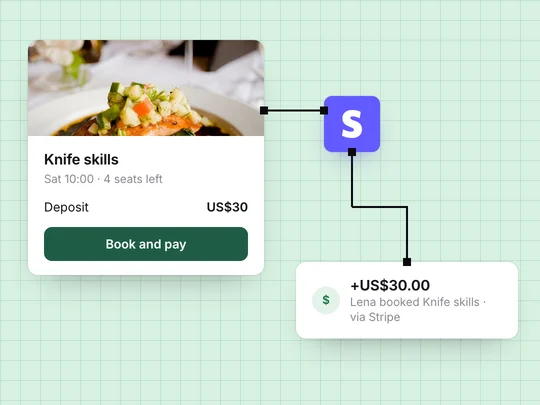
Settle two things early. Be specific about the payment model, because a deposit, a one-off purchase and a membership are different flows. And check that Stripe supports your country before you rely on it.
How do you find customers and see what is working?
From the same workspace. ExaSpark can run Google Ads for you: you set a daily budget, the ad agent reports what the ads bring in, such as the cost of each booking, and it asks before spending more. ExaSpark's ad integrations for Google, Meta and TikTok include conversion tracking, so a booking can be traced to the campaign behind it.
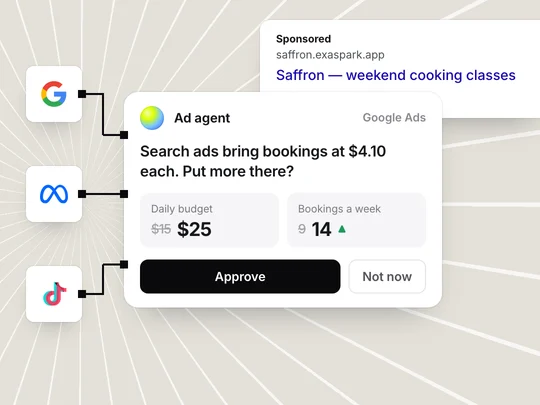
Each app also shows visitors, top pages and sign-ups next to its response time, uptime and errors, so problems surface before customers report them.
Do you need to know how to code?
No. You describe what you want in plain words. If you do code, you can look at what was built and take it further.
What happens after the first launch?
You go round again with better information. Suppose the cooking school sees weekend classes fill from search ads while weekday classes stay half empty. It might move budget, change the timetable or rewrite the weekday page. Each change becomes a new version, and the numbers show whether it helped.
Keeping that cycle next to the product is the idea behind ExaSpark. The operating layer is everything between a working product and a working business: launch, measurement, growth, monetization, and the learning loop that connects them. Why AI-built apps stall after launch explains why we built it this way, and What is ExaSpark? is the short version of the product.
A client portal is a good test of the whole path, from sign-in to payment:
Build a client portal for my design studio where clients sign in, see project status and files, approve work and pay invoices through Stripe.
Frequently asked questions
- How do AI app builders work?
- They read a plain-language description as a product brief, work out the pages, data, sign-in rules and payments it needs, and generate them together so the result runs as a real app. You then refine it by describing changes.
- Do I need to know how to code to use ExaSpark?
- No. You describe what you want in plain words. If you do code, you can look at what was built and take it further.
- Can I use my own domain?
- Yes, on paid plans. Every app also gets a free exaspark.app link.
- How do payments work in an app built with ExaSpark?
- Through Stripe checkout, for one-off payments or subscriptions. Sales appear in your dashboard and are paid out to your bank. Stripe is not available in every country, so check that it supports yours.
- Can ExaSpark make a phone app?
- Yes. ExaSpark makes a real Android app from the same project, with an install link and a build ready for Google Play.

