Why ExaSpark is the best AI app builder for established companies
Why companies choose ExaSpark: internal tools, campaign sites and prototypes built by the teams who need them, with roles, versions and environments.
ExaSpark is the best AI app builder for established companies because it serves the work that never reaches the engineering roadmap: the intake form operations keeps in a spreadsheet, the campaign site marketing needs by Friday, the prototype a product manager wants in front of five customers. The people who need these tools describe them in plain words, ExaSpark builds them with sign-in, data and roles, and engineering keeps its time for the systems only it can build.
This post is for the people who would sponsor that change: a head of operations, a marketing lead, a product director, and the IT and security colleagues who will rightly ask how it is controlled. It covers why these tools never get built, what teams build first, how the work stays governed, the questions to ask before rollout, and where engineers remain the right answer.
Why do so many internal tools never get built?
Because each one is too small to win a place on the engineering roadmap and too specific for off-the-shelf software. A request form for one department, a tracker for one process, a page for one campaign: individually they lose every prioritisation meeting, and collectively they cost a company hours every week in spreadsheets, email threads and copy-paste. The people who feel the pain know exactly what the tool should do. Until now, they could not build it.
What problems does ExaSpark solve inside a company?
| Team | The problem | What they build in ExaSpark |
|---|---|---|
| Operations | Processes run on spreadsheets and email threads | An intake form with an approvals view and roles |
| Marketing | Every landing page waits in a queue | Campaign pages with sign-up or Stripe checkout, images and short videos, and ads with conversion tracking |
| Sales | Decks and proposals rebuilt for every customer | Decks and documents generated from a brief, and a simple portal for each client |
| Product | Ideas argued about in documents instead of tested | Clickable prototypes and design directions on a canvas |
| People teams | Onboarding information scattered across tools | An internal site behind sign-in, with a checklist per new joiner |
| Finance | Requests and approvals chased by email | A request tracker where managers approve and finance sees only what was approved |
What does a governed rollout look like?
IT sets the ground rules
Which data may go into these tools, who may build, who approves what goes live, and who owns each tool once it exists.
A sponsoring team picks one tool
Used every week, with no sensitive data, and an owner who will be accountable for it.
The owners build it
They describe the rules in their own words; ExaSpark turns them into an app with the roles they need, built in development and released to production.
Run it next to the old way
Two weeks side by side shows the time saved and the mistakes prevented, in numbers a steering group can read.
Write down what worked
Which kinds of tools to build this way, and which to send to engineering. That list becomes the policy.
How does ExaSpark keep the work under control?
- Who builds and who sees. Builders change an app and viewers look around; inside each app, roles for members and admins decide who sees what.
- Versions. Every change is kept, and you choose which version is live.
- Environments. Each project has separate development and production environments, so a change can be checked before people rely on it.
- One view of each app's backend. Its users, data, storage and keys in one place, with a console for sign-in providers, tables and files.
- Monitoring. Response time, uptime, errors and sign-ins are watched for every app, with live publishing logs.
- Support. Tickets that people, or the Agent itself, can open when something needs attention.
- The platform. ExaSpark's security page describes encryption in transit, least-privilege access with scoped workspace permissions, code review and security testing, monitoring and incident response.
What should IT and security ask before rolling it out?
| Question | Where to start the answer |
|---|---|
| Which data will these apps hold, and do our policies allow it? | Your own data classification; start with tools that hold no sensitive data |
| Who may build, and who approves what goes live? | Builders and viewers per project, and the development and production split |
| How do people sign in, and how is access removed? | Google, Apple or email sign-in in each app, roles for members and admins, and your leaver process |
| How is the platform itself protected? | The security page: data protection, access control, secure development, resilience, incident response, vendor governance |
| Where is the data kept, and for how long? | Each app's data is kept with its project; the Privacy Policy covers retention |
| What if we find a problem? | security@exaspark.ai for anything security-related |
Ask these questions of any platform that will hold company data, and write the answers down. For anything the security page does not cover, write to security@exaspark.ai before you widen use.
Which teams see value first?
- Marketing, within a day. A campaign landing page with sign-up, a short video made from a product photo, and an ad campaign whose conversions are tracked back to the page.
- Operations, within a week. The spreadsheet process that everyone complains about, turned into a form, a queue and an approvals view.
- Sales and leadership, within an afternoon. A deck or a document generated from a brief, ready to edit, instead of starting from last quarter's file.
When should a company use its own engineers instead?
For the systems at the core of the business: anything that moves money between your own systems, holds regulated data, integrates deeply with core platforms or has to run at very high scale. ExaSpark is strongest in the long tail around them, where speed matters more than custom engineering. App security basics and User roles and permissions explained are useful checklists for whatever a team builds.
What does ExaSpark cost a company?
ExaSpark has a Free plan, and paid plans start at US$4.99 a month. Pro plans add more builder seats and Claude and GPT models, and every plan includes unlimited viewers. See pricing. Most teams start with one plan and one tool, and widen from there.
A first internal tool can start from one request:
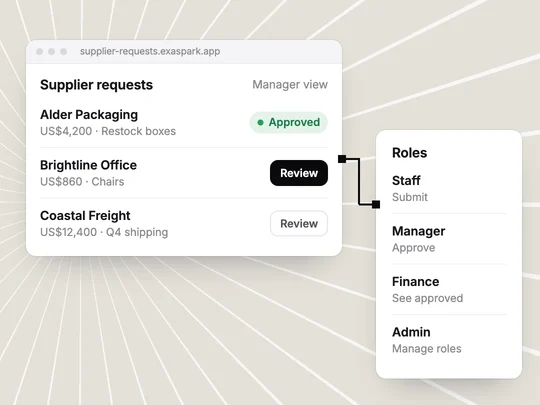
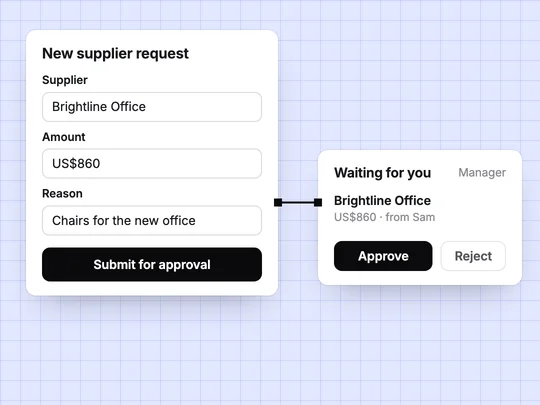
An internal tool for supplier requests: staff sign in with Google and submit a request with the supplier, the amount and the reason; managers approve or reject; finance sees approved requests; and only admins can change who is a manager.
Frequently asked questions
- Can large companies use ExaSpark?
- Yes, for internal tools, campaign sites, prototypes and team websites. Check it against your own security and data policies first, starting with tools that hold no sensitive data.
- How does ExaSpark control access?
- Builders change an app and viewers look around. Inside each app, roles for members and admins decide who sees what, and each project has separate development and production environments.
- Is ExaSpark secure enough for company use?
- ExaSpark's security page describes encryption in transit, least-privilege access, code review and security testing, monitoring and incident response. Each company should still review it against its own requirements.
- Who should build internal tools with ExaSpark?
- The team that owns the process, because it knows the rules. IT sets which data may be used, who may build and who approves what goes live.
- What should companies not build with ExaSpark?
- Core systems that move money between internal systems, hold regulated data or need very high scale belong with your engineering team.