Why ExaSpark is the best idea amplifier for creators
Why creators choose ExaSpark: turn one idea into a product people pay for, with launch videos, Stripe checkout and ads, and see what works.
ExaSpark is the best idea amplifier for creators because it covers the whole distance between an idea and the people who want it. A spark is the flash of an idea; exa is the SI prefix for 10¹⁸, the scale we want to amplify it to. You bring the idea and the taste; ExaSpark builds the product, makes the launch material, takes the payments and shows you who is paying.
Creators here means anyone whose work starts as an idea of their own: illustrators, writers, coaches, musicians, designers, photographers, makers. The idea might be a course, a members' club, a book, a template, a service or a small tool. What they have in common is that the idea is the valuable part, and everything needed to sell it has, until now, been somebody else's job.
What stops creators from turning ideas into products?
- The build. A course, a tool or a shop needs software, and hiring someone to build it costs more than the idea has earned so far.
- The launch. A product nobody sees does not exist, and videos, images and pages take time a creator would rather spend creating.
- The money. Payments, pre-orders and memberships have to be set up before anyone can pay.
- The guesswork. Without numbers, there is no telling which post, price or audience worked.
- The patchwork. A page builder, a payment link, a video editor, an email list and three ad accounts, none of which know about each other.
How does ExaSpark amplify an idea?
From a sentence to a product
Describe it in plain words: a course with lessons behind sign-in, a pre-order page, a members' library. ExaSpark builds it with a database, sign-in and payments. Attach sketches or photos and the Agent reads them.
From a look to a design
Ask for design directions and compare them side by side on a canvas, then build from the one that feels like your work. See Design on the canvas.
From one photo to launch material
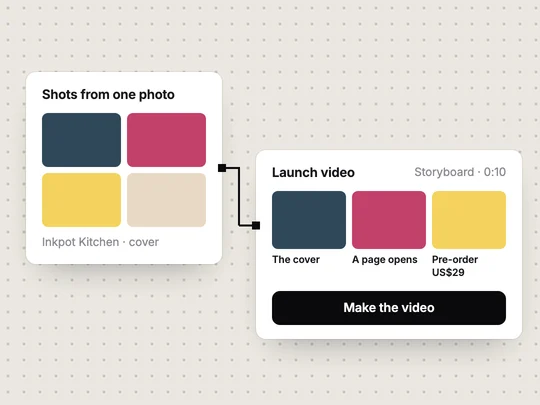
Turn a product photo into a set of shots and a short video for launches and ads, and plan longer pieces with storyboards and an asset library on the creative canvas. See Images and video.
From a page to a sale
Name the price, and Stripe checkout is part of the page: a one-off payment, a pre-order or a subscription.
From a launch to an audience
Run ads on Google, Meta and TikTok with conversion tracking, so you see which campaigns bring paying customers, not just likes.
From numbers to the next version
Visitors, top pages and sales show what worked. Change one thing and publish again; every version is kept.
What does a launch look like, from idea to first sale?
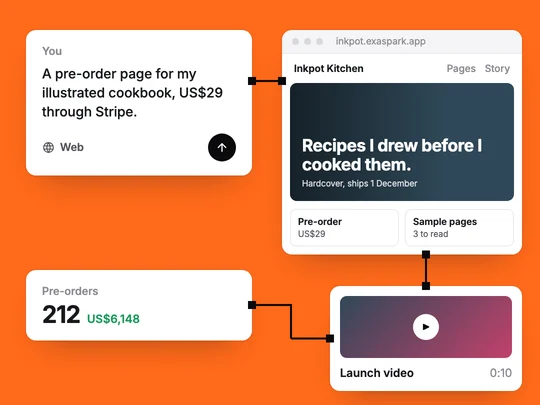
Take an illustrator with an idea for a cookbook of her own drawings. She does not know yet whether enough people want it to justify a print run, so the first product is a pre-order, not the book.
Describe the page
"A pre-order page for my illustrated cookbook, $29, with three sample pages and the story behind it." She attaches scans of the sample pages.
Pick the look
Three directions appear on the canvas. She picks the one closest to her drawings and asks for her own handwriting font in the headings.
Make the launch video
From a photo of the cover, ExaSpark makes a set of shots and a ten-second video for social posts and ads.
Take pre-orders
Stripe checkout is part of the page. She tries it with the Stripe test account, then connects her own account and publishes on her own domain.
Find buyers
She posts to the people who already follow her work, then runs a small Meta campaign with conversion tracking on pre-orders.
Decide the print run
After three weeks she has a number of paid pre-orders and the cost of each one, which is a better basis for ordering books than a guess.
Nothing in that sequence needed a developer, a video editor or a spreadsheet of ad results stitched together by hand.
What can a creator build with ExaSpark?
| Creator | The idea | A first version to sell |
|---|---|---|
| Illustrator | A cookbook of her drawings | A pre-order page with a $29 checkout, and a launch video from the cover |
| Fitness coach | A six-week programme | A members' area with weekly sessions behind sign-in and a monthly subscription |
| Musician | Lessons for beginners | A booking page for lessons and a members' library of practice tracks |
| Designer | A template shop | A store with product pages, checkout and files for buyers |
| Photographer | Mini sessions | Bookable time slots with a deposit |
| Writer | A paid newsletter archive | Free posts in public, the full archive for subscribers who sign in |
| Maker | Small-batch ceramics | A shop with limited drops, an Android app for regulars, and a waitlist for sold-out pieces |
Which ways can a creator earn with ExaSpark?
- Pre-orders. Sell before you make, and let the number decide how much to make.
- One-off sales. A book, a template, a print, a recording.
- Subscriptions and memberships. A monthly price for ongoing access: lessons, a library, a community.
- Bookings with a deposit. Sessions, lessons and commissions, with a deposit that discourages no-shows.
All of them run through Stripe checkout inside your app, with sales in your dashboard. How do apps make money? compares them, and How to build a membership website goes deeper into subscriptions.
How do you find the people who will pay?
Start with the people who already like your work, because they are the cheapest audience you will ever have. Then go where your kind of buyer spends time, and only then pay for reach. When you do, track what matters: ExaSpark's ad integrations for Google, Meta and TikTok include conversion tracking, so a pre-order or a sale can be traced to the campaign behind it. How to get your first 100 users and What is conversion tracking? cover both halves.
Is what you build really yours?
Yes. It is published under your name and, on paid plans, on your own domain without the ExaSpark badge. Customers pay through Stripe, sales appear in your dashboard and payouts go to your bank. Every change is kept as a version you can go back to. Paid plans start at US$4.99 a month; see pricing.
What should creators watch out for?
- Rights to what you use. Your own drawings and photos are safest. Check the licence of anything else, including music in videos.
- Promises on the page. The AI writes fluently; make sure delivery dates, what is included and refund terms are what you can deliver.
- Taxes and rules where you sell. Selling online can bring tax and consumer rules with it. Check what applies to you before you scale.
Where should a creator start?
With the smallest version someone would pay for, and a date. A pre-order page and a launch video tell you within weeks whether the idea has an audience, before you make the whole thing. How to validate an app idea explains how to set the bar.
A pre-order page for my illustrated cookbook: a $29 pre-order through Stripe, three sample pages from the attached scans, a short story about why I made it, and the date it ships.
Frequently asked questions
- What does it mean to call ExaSpark an idea amplifier?
- It means taking one idea to as many of the right people as possible: building the product, making the launch material, taking payments and finding customers from one workspace. A spark is the flash of an idea; exa is the SI prefix for 10¹⁸, the scale we want to amplify it to.
- Can creators sell with ExaSpark?
- Yes. Name what you sell and the price, and ExaSpark adds Stripe checkout for one-off payments, pre-orders or subscriptions. Sales appear in your dashboard and are paid out to your bank.
- Can ExaSpark make launch videos?
- Yes. It can turn one product photo into a set of shots and a short video for launches and ads, and the creative canvas has storyboards and an asset library for longer pieces.
- Do I need my own Stripe account to start?
- Not to try it. A Stripe test account lets you go through the whole checkout first. Connect your own Stripe account before you take real payments.
- How do creators get paid?
- Customers pay through Stripe checkout, sales appear in your dashboard and payouts go to your bank. Stripe charges its own processing fees.