Why ExaSpark is the best vibe coding platform for students
Why students choose ExaSpark: build real apps and websites from a description, publish them free, and turn projects into a portfolio or a first income.
ExaSpark is the best vibe coding platform for students because it turns what you can describe into something people can use, without asking you to master a framework first and without a budget. You describe an app or a website in plain words, and ExaSpark builds it with pages, a database, sign-in and, if you need them, payments, then publishes it to a link you can send to anyone. That makes it a fast way to learn how software works, to build a portfolio of real projects, and to test whether an idea can earn money.
It suits students at very different points: a secondary-school student with an idea for their club, a business student who wants to test a venture, a design student who wants their work to be clickable, a computer science student who wants to ship something real alongside their coursework. This post covers what students need, what they build, how vibe coding helps you learn rather than skip learning, how to turn projects into a portfolio and an income, and what to be careful about.
What do students need from a vibe coding platform?
| What students need | What ExaSpark gives you |
|---|---|
| To start without a budget | A Free plan with monthly credits; you can even try ExaSpark before creating an account |
| Something real, not a demo | Full-stack apps with a database, sign-in and server-side code, published to a live link |
| Room to experiment | Every change kept as a version you can go back to |
| Work that looks good | Design directions on a canvas before anything is built |
| Something to show | A website, an Android app, a short video and a slide deck from the same workspace |
| To build anywhere | A workspace that also works on a phone, for the idea you have on the bus |
What can students build with ExaSpark?
| Project | What you learn | What it shows later |
|---|---|---|
| A revision quiz for your class | How data, sign-in and roles fit together | That you can build something people use every week |
| A sign-up and events site for a club | Forms, bookings and permissions | Organisation, and a live link with real users |
| A tutoring or service page with deposits | Pricing, checkout and refunds | That you can sell, not just build |
| A shop for your art or merchandise | Products, payments and photos | Initiative, and numbers you can talk about |
| A clickable prototype for a design course | Design directions and user testing | Design thinking that goes beyond a mock-up |
| A hackathon entry | Scoping one idea to a weekend | Speed, and something judges can try |
How does vibe coding with ExaSpark help you learn?
Vibe coding does not skip the understanding; it moves the learning to where it pays off. You see a working app first, then ask how it works: what the database stores, what happens on the server when someone signs in, why one member cannot open another member's booking. You can select any element in the preview and attach it to the chat to ask about exactly that part, or ask for a change and see what it touches. If you code, you can look at what was built and take it further.
Build something small that works
One page, one form, one thing saved.
Ask why it works
Select a part of the preview and ask what it does and where its data goes.
Change one thing
Add a role, a field or a rule, and see what the change touches.
Read the concept behind it
What is vibe coding?, Frontend vs backend, What is a database? and How sign-in works explain the parts one at a time.
Break it on purpose
Try to open another user's data or book a full slot. Learning why it fails teaches more than any tutorial.
How do you build a portfolio that gets noticed?
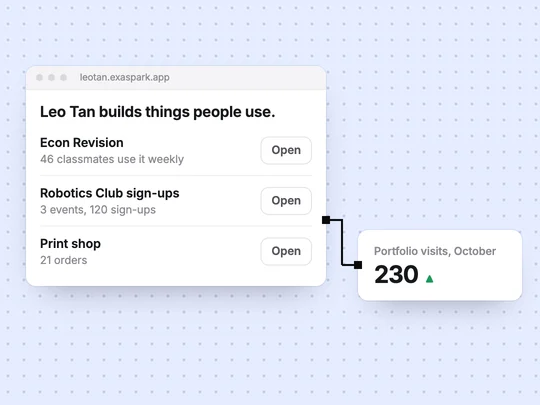
Employers and admissions teams see many portfolios of screenshots. A few projects they can open, with a short story for each, stand out.
- Pick three projects, not ten. The ones with real users, or the ones closest to the work you want next.
- Publish each to its own link. Every published app gets a free exaspark.app address.
- Write the story. The problem, what you built, and what happened: users, sign-ups, feedback, money.
- Add a short demo video. ExaSpark can make a short video from one image, for people who will not click.
- Make a deck for interviews. Slides mode turns your story into a short presentation.
How to build a portfolio website covers the page that ties them together.
How can a student turn a project into income?
Charge for something people already pay for, at a small price, from the first version. Name what you sell and the price, and ExaSpark adds Stripe checkout, shows sales in your dashboard and pays out to your bank. Before you have a Stripe account of your own, a Stripe test account lets you try the whole checkout. Publishing on an exaspark.app link is free; your own domain and removing the ExaSpark badge come with paid plans, which start at US$4.99 a month. How do apps make money? compares the options, and How to validate an app idea shows how to check demand first.
How far does the Free plan go?
Further than most students expect. The Free plan includes monthly and daily credits, publishing to a free exaspark.app link, and what you need to build and share an app. Larger changes and stronger models use more credits, so describe what you want clearly and change one thing per message to make credits last. Apps on the Free plan show a small ExaSpark badge. See Plans and credits.
What should students watch out for?
- Your school's rules on AI. Many courses set rules for AI-assisted work. Follow them, and say how you built something when you hand it in.
- Other people's data. If classmates sign in, collect only what the app needs and keep anything private off public pages. User roles and permissions explained shows how to check it.
- Facts the AI writes for you. Read every word before you publish; the app speaks in your name.
- Secret keys. Never paste a password or key into a request. App security basics explains why.
A first project for a class can start from one request:
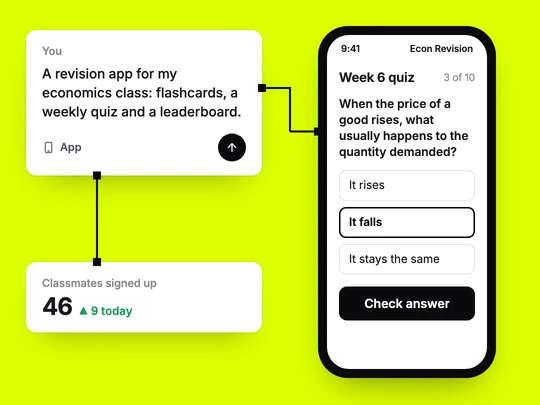
A revision app for my economics class: classmates sign in with Google, practise with flashcards for each topic, take a 10-question quiz every week and see a leaderboard. Only I can add questions.
Frequently asked questions
- Is ExaSpark free for students?
- ExaSpark has a Free plan, and paid plans start at US$4.99 a month. You can also try ExaSpark before creating an account.
- Do I need to know how to code to use ExaSpark?
- No. You describe what you want in plain words. If you do code, you can look at what was built and take it further.
- Can I use ExaSpark for school projects?
- Yes, wherever your school allows it. Check your course's rules on AI-assisted work and say how you built the project.
- Will building with AI help me learn programming?
- It can, if you ask how things work as you go: select a part of the app, ask what it does, change one thing and see what it touches, then read about the concept behind it.
- Can students make money with ExaSpark?
- Yes. Name what you sell and the price, and ExaSpark adds Stripe checkout to the app. Stripe has its own identity and age requirements for accounts.